
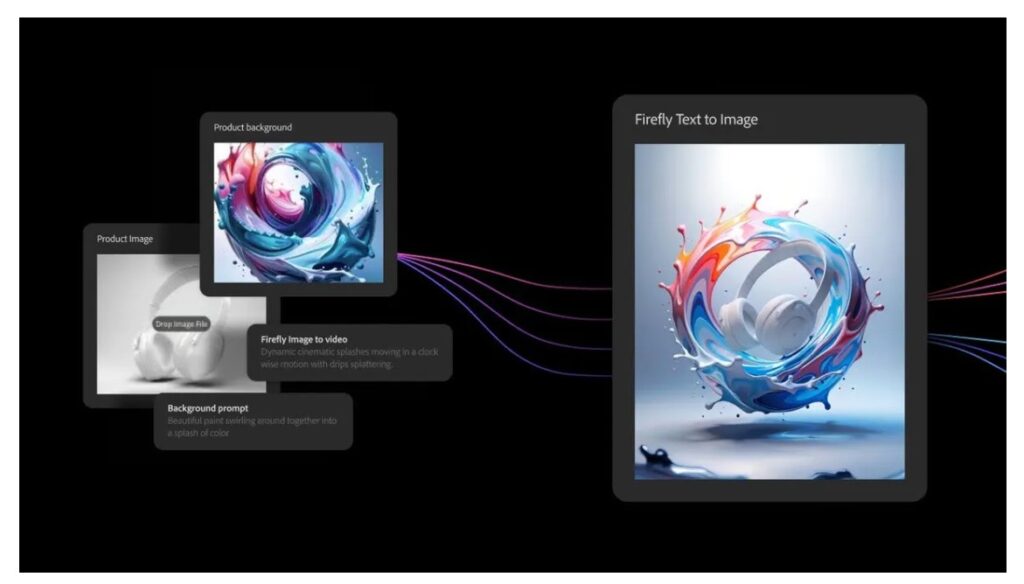
This article from Creative Bloq talks about Project Graph, unveiled by Adobe at its MAX conference, as a potential game-changer for creatives. Project Graph gives users a visual, node-based environment to design custom creative workflows. Instead of juggling multiple apps and manually transferring assets between them, users can combine tools from across the Adobe ecosystem, such as Photoshop, Illustrator, and Premiere Pro, and even integrate third-party AI models from partners such as Google and OpenAI.
With Project Graph, creatives can assemble models, effects, and editing tools into workflows, then package them as “capsules,” that is, simplified, reusable tools that can be shared and dropped directly into any compatible Adobe app. This moves the creative process away from repetitive prompting and manual chaining, toward a more flexible, modular way of working.
The need for this arose from the growing complexity and fragmentation of AI-powered creative tools. As companies release multiple specialized apps and plug-ins, managing them becomes a burden. Project Graph was born inside the Adobe Incubator, where a small team prototyped a need, then scaled it into this broader system after realizing its value.
For professionals, such as motion designers, photographers, and video editors, Project Graph promises freedom: the ability to fine-tune workflows, iterate fast, build custom tools, and share them across platforms without needing coding skills. It essentially democratizes control over AI-driven creativity.
Project Graph is “coming soon,” with Adobe encouraging interested users to sign up for updates.
