

 The race to infuse engineering software with artificial intelligence has every major CAD company frantic, eager to demonstrate that they are embracing and implementing AI. But are all CAD programs equally prepared to implement AI? Legacy file-based CAD programs, the ones that are most often in use today, are not as prepared as are more recently created programs, says Onshape’s Darren Henry. They were never designed for granular real-time data access. Onshape, however, is cloud-native and uses a granular database structure instead of files, making it ideal for AI implementation.

Onshape enters 2026 with a certain momentum. PTC, which acquired Onshape in 2019, maintains that Onshape is by far the fastest-growing CAD and PDM system available, and is now winning over large enterprises such as Henkel, Garmin, Ocado and Trek. In education, Onshape claims a huge footprint: 5.5 million lifetime EDU signups, with 1.2 million last year alone. “A new user every six seconds,” we hear. Also, three-quarters of all FIRST Robotics teams use Onshape.
Onshape continues to offer an extremely popular free plan. From its introduction, Onshape let users create and save models for free, but unless you subscribed to the paid version, your models could be seen by anyone. All anyone had to do to see your work was to open Onshape account, which was free. The company no doubt figured professional users, those other than students and hobbyists, those who designed consumer and commercial products, would give the free Onshape a spin, but quickly move on to the paid version to protect the company’s intellectual property. For this eventuality, Onshape could afford to support the free loaders taking advantage of all the cloud storage Onshape had to pay for. But with the advent of AI, the freely accessible models and the command stream that created them went from being an expense Onshape had to bear to an opportunity in the feverish market of AI, providing Onshape with a set of data on which its AI can learn.
The free version of Onshape is the mainstay of educational users and may have remained popular even in commercial use. It has resulted in millions of publicly accessible models — and, most importantly to this story, each model comes with all the commands used to create it, which only Onshape may access. Every use of free Onshape, every command, every mistake corrected, every model that results, generated data that AI can learn from. If ever a CAD program is able to “make me a [part, assembly, you name it]” on demand, that even hopes to get it right, it has to be Onshape.
Onshape emphasizes that only public data from users of the free version is used, whereas commercial (paid) and educational customers’ data is segregated, unseen, and untapped.
But what will have the most consequences for the next decade of engineering software is AI, and the advantage goes to those with the most training data. Onshape can draw on a vast repository of public-domain models. In addition, Onshape is the only major CAD system that is both cloud-native and database-driven, whereas all the rest are file-based.
All in all, this gives Onshape a foundational advantage in implementing AI, says Darren.
Frictionless Data Access
Typical workflows in mechanical design require pushing files to the cloud, creating copies, synchronizing versions and dealing with the incompatibilities of locally installed software. Onshape dispenses with all of that, allowing AI to operate directly on the data without regard to file structure, which is, in all cases, proprietary and may change with each release. You literally have to hack into a CAD file, or more specifically, import, read, interpret and then export the data. Since Onshape stores models as data, there is no need for any of this hacking.
Following Breadcrumbs
Onshape’s ability to store every action, every feature creation, edit, suppression, rollback and mistake, the entire process that created the model, lets users use AI without fear. Users can let an AI agent modify a model and, if necessary, restore the design to its initial state before the AI took action.
AI-Scale Corpus of Geometry
Onshape calls its trove of models from millions of free-use sessions the Public Library. It contains over 15 million models. Adding to that AI-learnable material is a robust library of the company’s own release materials, including tutorials and videos for learning every aspect of Onshape.
Altogether, it is a wealth of material for training AI agents. AI can be trained to generate drawings, dimensions, and models for optimization and related tasks.
Other MCAD programs, being file-based and desktop-bound, can only train on their own training materials and whatever can be donated by users upon request. There’s no way a user-by-user donation can match the wholesale productions of users who have created models for ten years.
Enter Onshape AI Advisor
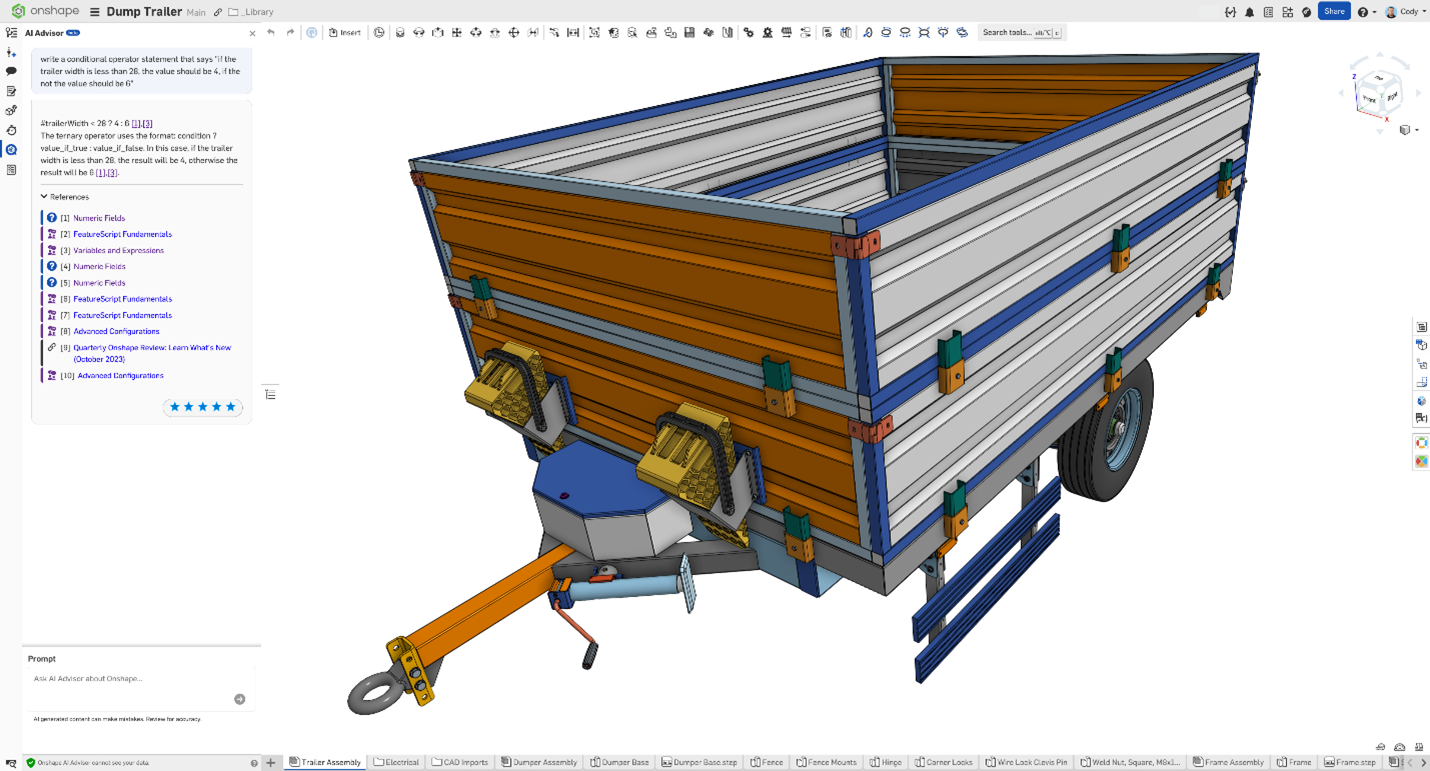
AI Advisor is Onshape’s first deployed, production-scale AI system. Since Onshape runs in the cloud rather than locally and does not require manual installation, AI Advisor is immediately available to all users, whether students, hobbyists, or paying designers and engineers.
New users will encounter AI Advisor in the Learning Center and go on to use it in their work. As of mid-October 2025, AI Advisor has been available as a chatbot. It is as familiar as ChatGPT but totally business-like, providing a core navigational layer for learning, troubleshooting and accelerating the Onshape workflow.
AI Advisor is grounded in Onshape’s own documentation, videos, and training materials, not the publicly available, often fallible data that underlies a general-purpose LLM. Therefore, Onshape does not suffer from the “hallucinations” that appear all too often with large language models (LLMs, like ChatGPT).

As Onshape’s Cody Armstrong explains, “We really wanted the most accurate interactive AI experience possible and by augmenting [the model] with our own learning materials, we get that experience.” Rather than guessing what a “pattern” or “revolve” operation means, AI Advisor understands it exactly down to its subtleties.
Armstrong demonstrates a simple query— “How do I pattern a sketch?” AI Advisor correctly responds with the exact workflow: how to select entities, flip directions, finalize patterns and accept results within Onshape’s interface. It then provides citations to specific help resources and training content, linking users to deeper explanations when needed.
AI Advisor goes beyond feature-level how-to by supporting workflow-level guidance, offering structured design approaches to complete tasks. When asked, “How would I model a piston in an engine?” the Advisor gives you all the steps: create a master sketch, revolve core geometry, consider Boolean operations for multi-part modeling and anticipate manufacturability constraints.
The Advisor is also capable of generating executable code and answering prompts. You can ask it to create FeatureScript with “Write a conditional operator statement FeatureScript expressions for a cut and paste,” for example.
Creating code is important to engineers because, try as we might, whatever programming we learned fades away. Even veteran CAD users find themselves in unfamiliar territory when programming and have to resort to the documentation, leading to much trial and error. AI Advisor replaces all that friction with a single interaction, giving engineers direct access to Onshape’s deeper programmability — no coding knowledge required.
By making AI available to one and all, be they a high-school robotics team or the largest enterprise deployment, it cannot help but draw more users to AI. And the more people use the AI, the smarter it will get, creating an upward spiral of AI usefulness and adoption.
AI Advisor represents the first stage of Onshape’s three-tier AI strategy: 1) advise, 2) assist, and 3) automate. Today, it’s advice. Tomorrow, it is auto-completing FeatureScript, visual search, model-aware diagnostics and eventually agentic operations.
Now this is getting exciting.
Semantic Indexing and AI-Powered Search
Imagine typing “idler gear” into a multi-thousand-part machine model and instantly all gears that behave as idlers—even if none contain the word idler in their metadata — are highlighted.
Onshape’s new way of finding parts, assemblies and subcomponents will be based not on names but on the data they contain. Traditional search, such as that performed by PLM programs, relies on searching by file name or parsing metadata, AKA the non-geometric data you have added, such as material, finish, GD&T info, part numbers, etc. PLM and PDM systems can find parts based on metadata in the file as well as file names. File names can be descriptive, but they are often derived from project names, numerical sequences, or a company’s scheme. And so, finding something as common as a screw or bracket can be a hit-or-miss affair. Engineers waste hours scanning folders, squinting at thumbnail images or opening files to get a full view, getting clues from dates, file size, etc.
Onshape’s AI-powered search relies on an AI-generated semantic summary of a model’s visual and geometric characteristics. In theory, this means a user can type a natural-language term like robot arm, valve block, or bearing and retrieve the correct part—even if its file name is cryptic, such as “CRB15000” or “Omnicore_rev3.”
Onshape’s AI-based search is not to be confused with an image-query system where users prompt by pointing to photos or snapshots (at least not yet). Instead, the model analyzes the thumbnail and the underlying basic geometry of parts and assigns semantic descriptors—machine-learned tags representing concepts such as rotational joint, gripper, hydraulic port, cylindrical housing, gear train geometry, and so on. When a user enters a textual query, the system maps the request onto these learned visual descriptors and returns matches based on conceptual similarity.
Searching through a large library of models, such as the 15 million model library in the commons, manually would be impractical. But AI semantic indexing offers a practical and useful alternative.
Look for the AI search to debut in the public repository first, where the model can be tested on a small scale and later extended to private enterprise datasets.
Such an AI-powered search will enable users to:
- Avoid redundant design work by quickly identifying reuse candidates.
- Create standardized part libraries by categorizing and cataloging existing parts
- Accelerate new hires to get up to speed faster by finding parts more easily and not wasting time redesigning the wheel
- Allow Onshape’s next-generation AI agents to find parts faster
AI-Assisted Quick Render: No Physics Required
Photorealistic rendering, while familiar to all, remains a foreign language to many CAD users.
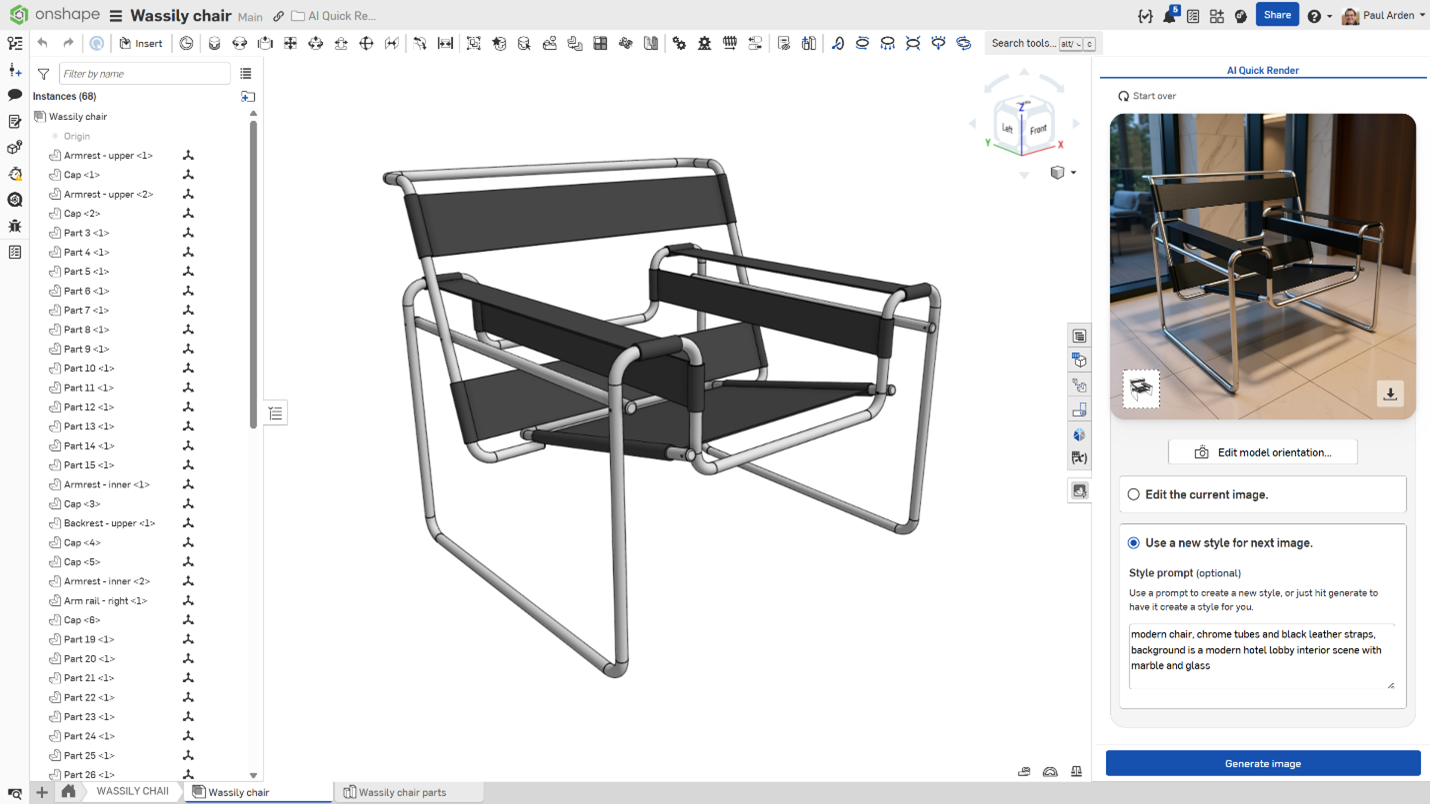
GPU acceleration has helped make stunning images faster but professionally executing a render still requires mastery of lighting, camera techniques, setup, and material application — and that’s just for still images. Making videos requires learning how to create tracks and timelines, etc. A user may dabble in rendering, making a quick rendering by using defaults but to do anything worthwhile requires learning the basics of photography and videography. Onshape dispenses with that with an upcoming AI-assisted Quick Render, which produces photorealistic images in seconds using simple natural language prompts, as you would with ChatGPT.
Quick Render does not work by ray tracing. Instead, as Darren explains, the system is powered by “a diffuse modeler… much like the image generation you find in other ChatGPT programs like DALL·E and [Google’s] Nano Banana,” the latest of the new crop of AI diffusion modelers which are somehow able to distinguish objects from backgrounds in a photo, essentially a 2D field of pixels.
Once an object is recognized, AI can apply finishes, textures, and colors. Quick Render’s latest-generation AI image synthesis technology is laid over the Onshape model geometry to create an image that looks almost every bit like a physics-based rendering.
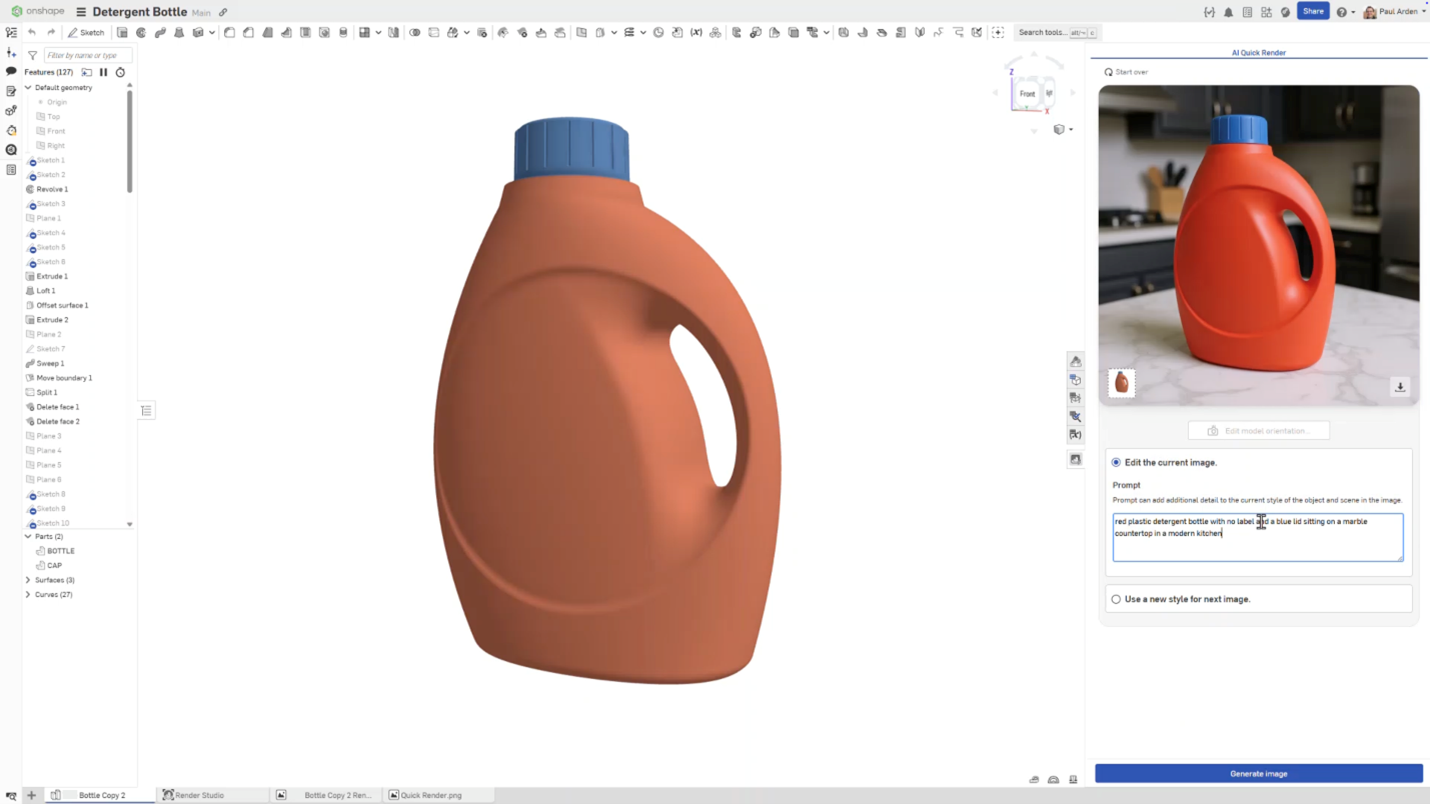
Within seconds, Quick Render produces a finished image that reflects the prompt: correct colors, environment, and stylistic cues. Because the underlying technology is generative rather than simulated, users can also alter the background, lighting, or style simply by re-prompting: “put it on a wood table,” “make it studio lighting,” “rotate the object,” “use soft shadows,” and so on.
AI Quick Render is not intended to replace Render Studio, Onshape’s existing physically grounded renderer. For cases requiring photometric accuracy—such as optical components, lighting studies, material validation, or client-facing product visualization—traditional renderers still provide unmatched fidelity and control. AI Quick Render is there for speed and convenience.
AI-Assisted Drawing Creation
 For decades, engineering drawings have demanded manual effort and their creation remains one of the most time-consuming and least productive activities in mechanical design to this day. Even teams that embrace 3D, model-based definition (MBD) and paperless philosophy may be required to produce 2D drawings to comply with suppliers or regulations.
CAD vendors have added templates and supplied macros that provide a degree of automation for view generation and annotation, but creating production-ready drawings still requires extensive human involvement. Dimensions must be placed, views aligned, tolerances added, callouts checked and geometric intent clarified. A minor change—a new configuration, a related variant, or a mirrored part—might require a whole new drawing.
Onshape’s upcoming AI-assisted drawing cuts through almost all that. The core mechanism relies on AI-powered edge similarity detection. Cody describes the workflow: a user selects a drawing view—one that already contains the desired annotations—and uses a new command, Replicate, to apply those annotations to another view or configuration. The AI then “goes through the edges and determines similarity between the two, [identifies] the likelihood of similarity and regenerates the annotations in that view based on the likelihood of them being the same”.
This is a radical departure from the automated dimensioning so far offered, in which dimensions require geometric correspondence between features and edges or datums. Onshape’s approach does not require identical geometry; it evaluates structural similarity—edge-to-edge, contour-to-contour—and intelligently adds dimensions to their new locations. It understands that the 12 mm fillet in a left-hand configuration corresponds to the same feature in a right-hand configuration, even if the orientation or surrounding geometry has changed.
The current implementation of AI dimensioning works view by view, but Onshape promises this approach will eventually work for all views at once, or even a series of drawings in which parts are somewhat similar. For companies that produce product families, products that vary in size, configurable parts, or repeated variants, this has enormous efficiency potential. For example, a team designing hydraulic cylinders can generate a single fully annotated base drawing, then have stroke-length or diameter variations automatically annotated.
The Future of Dimensioning
AI-assisted drawing lays the groundwork for standards-aware annotation. Onshape’s AI agents, presented later in the roadmap, will eventually be able to evaluate drawings for completeness, identify missing tolerances, and confirm adherence to industry standards and company practices.
They will be able to generate drawings from scratch using inferred design intent. The replicate feature thus serves as a bridge between manual drafting and fully automated drawing generation.
Automated dimensioning using AI leverages Onshape’s inherent database-based advantage. All model history, features and configurations exist in a unified database—not buried deep in files. AI tools can far more easily infer relationships between parts and views when data is easily accessible in a cloud-resident database.
AI Agents and MCP: Toward Autonomous Engineering Workflows
AI agents could very well mark the transition to true autonomy in CAD. These agents are not chatbots — far from it. They are active participants in the design process, capable of understanding context, performing tasks, modifying geometry, enforcing standards and collaborating with human users. AI agents are the foundation of the Model Context Protocol (MCP), a new layer that enables AI systems to interact with Onshape programmatically, securely, and at scale.
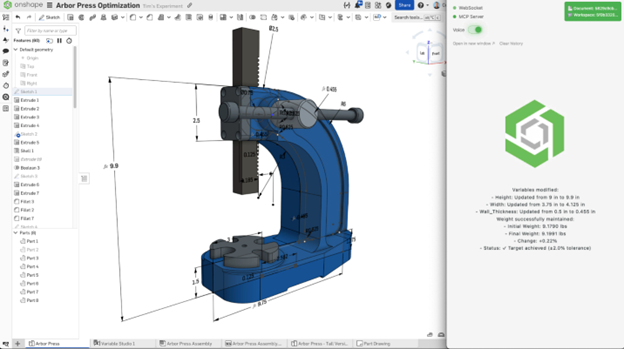
An AI agent in Onshape behaves like a human user. It works within permissions and access rights. Its actions are traceable actions and limited by clearly defined boundaries. As Cody explains, agents will be added to documents “very much like users,” where teams can specify what the agent is allowed to see, what it may modify and how much autonomy it has over operations like modeling, exporting, or drawing creation. This is a critical distinction. Instead of injecting AI deep into the software stack in ways that are opaque or irreversible, Onshape treats AI as a peer—visible, controllable and accountable.
Every action an agent takes is logged the same way as with a regular human user. It leaves a trail, a history timeline for engineers to review, accept, and if not to their liking, roll back. This accountability eliminates the fear of an all-powerful AI running amok with a design, never to be reversed and having to start all over. It is a fear that has prevented the use of tools that automate geometry (configurators, custom scripts, macros), which often go too far and too fast, making many untraceable modifications, making rollback impossible. By contrast, an Onshape AI agent’s action or action sequence will be transparent and as accountable as if performed by a team member.
Cody provides a few examples of an AI agent at work:
- Inspect a model and answer: “Why is this slow to regenerate?”
- Make the arbor press 10% taller and wider while keeping the weight the same.”
- Find all released aluminum parts in an assembly and export them as STEP files.
- Create a drawing of the pneumatic cylinder using an ANSI template and dimension it.
Onshape’s Model Context Protocol provides a standardized interface for agents—whether built by Onshape or by customers—to interact with Onshape’s data. It serves as the secure connective tissue that enables autonomous systems to query model metadata, fetch geometry context, update features, or trigger exports.
“MCP gives users a connection and allows access to Onshape models in a structured, permissioned way,” says Cody.
MCP also allows companies to build private, company-specific agents trained on their standards, templates, materials and modeling practices. These agents are constrained to the customer’s environment and hidden from other users—including Onshape itself. This opens the door to AI agents that enforce internal design rules, conduct nightly compliance checks, or optimize models according to manufacturing constraints known only to that company.
Conclusion: Onshape: Built for AI
Onshape’s cloud-native architecture, with its unified database, stands out for its readiness for AI. The company is not retrofitting machine intelligence onto 30-year-old file-based workflows; it is layering AI onto a system already designed for real-time data updating, multi-user collaboration and granular history tracking.
This has contributed to the company’s innovative adoption of AI. In an industry where most established incumbents have struggled to meaningfully implement AI, Onshape is shipping AI capability that works today and is planning for more.
Onshape’s AI Advisor demonstrates this with its smallest form: precise, contextual, grounded assistance woven into the modeling experience. AI-powered search shows how meaning, not file names and metadata, will define how engineers navigate design libraries. Quick Render proves that generative AI can lift the burden of visualization—letting engineers describe what they want in their language instead of learning the language of visualization applications, some of which are as complicated as CAD applications. And AI-assisted drawings reveal how even the most entrenched manual tasks can be accelerated through intelligent pattern recognition.
Onshape’s professed roadmap reveals AI agents and the Model Control Protocol, a framework for user- and enterprise-built agents that could enable AI assistants to operate alongside engineers and perform tasks on their behalf, enforce company standards, analyze geometry, and interact with data through secure, traceable channels. Agents turn CAD into a collaborative environment where AI is not a feature but a participant—one that can be audited, controlled and trusted.
If the last decade in CAD was defined by cloud adoption, the next decade will be defined by AI. intelligence. In that future, Onshape is not merely picking low-hanging fruit but seems bent on taking the lead in creating really useful AI, in particular, AI assistants.
