

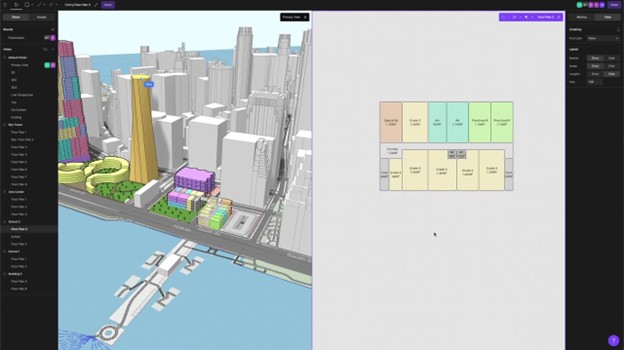
Unless you’ve had your head buried in the sand or work over the past four years, you’re well aware of the latest building information modeling (BIM) trend, BIM 2.0. What is BIM 2.0? Much like the original BIM marketing, it depends on who you talk to. However, I believe consensus is coalescing around the idea of it being a next generation of BIM tools and workflows that move away from large, monolithic, file-based, strictly desktop applications to web-based, always on, available anywhere, inherently collaborative (in real time) tools that break some conventions established by the traditional CAD/BIM vendors but cater more closely to the needs and desired workflows of end users. This is evident in the namesake offerings by companies such as Snaptrude, Testfit, Skema, Hypar, Qonic, Motif, and the subject of this review: Arcol.
What is Arcol?
Arcol, like other BIM 2.0 platforms, is very clear and succinct in its marketing about what it is — an online BIM platform optimized for collaboration across a team of potentially diverse stakeholders, including designers, owners, and general contractors. It is a combination of massing/spatial design modeling, analysis and reporting, along with real-time whiteboard-style collaboration and presentation tools (think SketchUp + Smartsheet/Excel + Miro/PowerPoint).
Aaron, Head of Growth at Arcol, indicated that the initial intent of the development team was to make an immediate impact on the industry by leaning into the idea of real-time collaboration, starting at the earliest design phase, where critical information forms the basis for the rest of the project four years ago, launched a private beta in 2023 and was released in June of this year.
Arcol’s focus has been architects and designers at more vertically integrated firms with expertise in large project development (commercial office/retail, residential, educational, medical, institutional and any mixed-use, from the earliest feasibility/pro forma stage. Now comes the fun parts, such as ongoing feedback from their customers.
If you’ve caught any of their talks and demos at various industry events, such as NXT BLD 2025, you’ve heard that Arcol aims to tackle the entire design process, with the same core idea of being web-based. The roadmap calls for it to be gradually made real-time collaborative. The Arcol you see today is just the beginning. The company intends to address the entire workflow, from feasibility to construction documentation, but is not yet ready to specify exactly when this will be achieved.
Not committing to a development roadmap with hard dates allows the company to react to user feedback, something Aaron has emphasized is crucial for the development team in making informed development decisions. This is evident in the way Aaron, their customer support team and even Arcol’s CEO, Paul O’Carrol, actively reach out to potential and new customers as they kick the proverbial tires and apply Arcol to real projects. Their outlook on growth is more ambiguous, not relying solely on typical ROI/sales metrics, but instead on answering the question, “Are we solving our customers’ problems?”
The Competitive Landscape
While Aaron indicates that they don’t really see the aforementioned BIM 2.0 companies as their competition, preferring to focus on the likes of BIM 1.0 companies: Autodesk, Nemetschek Group, Trimble and others, from the perspective of tool end users in the industry, Arcol does fall within a growing class of BIM 2.0 offerings, all web-based, that form 2 distinct categories, as follows:
- Direct competitors, those that also address feasibility, or schematic design, workflows include Skema, Testfit, Autodesk Forma (formerly Spacemaker), Snaptrude, Motif and Hypar. Being the newest kid on the block, Arcol has yet to incorporate the more advanced modeling complexity, machine-learning/AI assistance, parametric features and further design process workflows that these other platforms have. However, the company has established a base from which it could further develop to match many, if not all, of such features.
- Indirect competitors, such as SketchUp. Arcol may have used SketchUp for inspiration, but has exceeded it by incorporating multiple tools into a BIM 2.0 toolbox. There is a possibility of complementing other, more mature applications in other design processes/workflows, such as Qonic for detailed BIM development and dRofus for highly detailed data management of spatial/programming requirements throughout the lifecycle of a building, although not through any direct or indirect data exchange.
[Editor’s note: Arcol understands it is the “new kid on the block,” and as such, cannot yet offer all the advanced modeling, AI and parametric features of more mature competitors. However, it is comfortable with what it has done with feasibility, collaboration and communication, and is being well received by customers, according to a company spokesperson.]
Test Driving Arcol
Arcol has been proactive in promoting its message through various industry events and forums. Their demos are succinct — and seductive. Usually relatively brief, focusing on the high points of ease of use, the lag-free real-time collaboration, customizable data-rich modeling environment and presentation development for designers. Account Initialization With just a few easy-to-follow steps, you can set up an account for a single user or a team of collaborators —no complex dialogs, setup routines, or account type choices required. For project collaboration, name a team and add emails. Permission controls are straightforward.
For this review, I used Windows 11 Pro (24H2, 26100.5074) and Microsoft Edge Version 139.0.3405.125 (Official build) (64-bit) on a Razer Blade 14” (2023), AMD Ryzen 8945HS w/Radeon 780M integrated graphics, 32 GB RAM and NVIDIA GeForce RTX 4070 8 GB VRAM dedicated graphics.
It pays to go through the tutorial and review the user documentation, even if new tools appear to be super intuitive. Too many people skip this part and dive into a real project, only to risk being mired and getting a bad impression of the technology. Tutorials are built into the main project page:
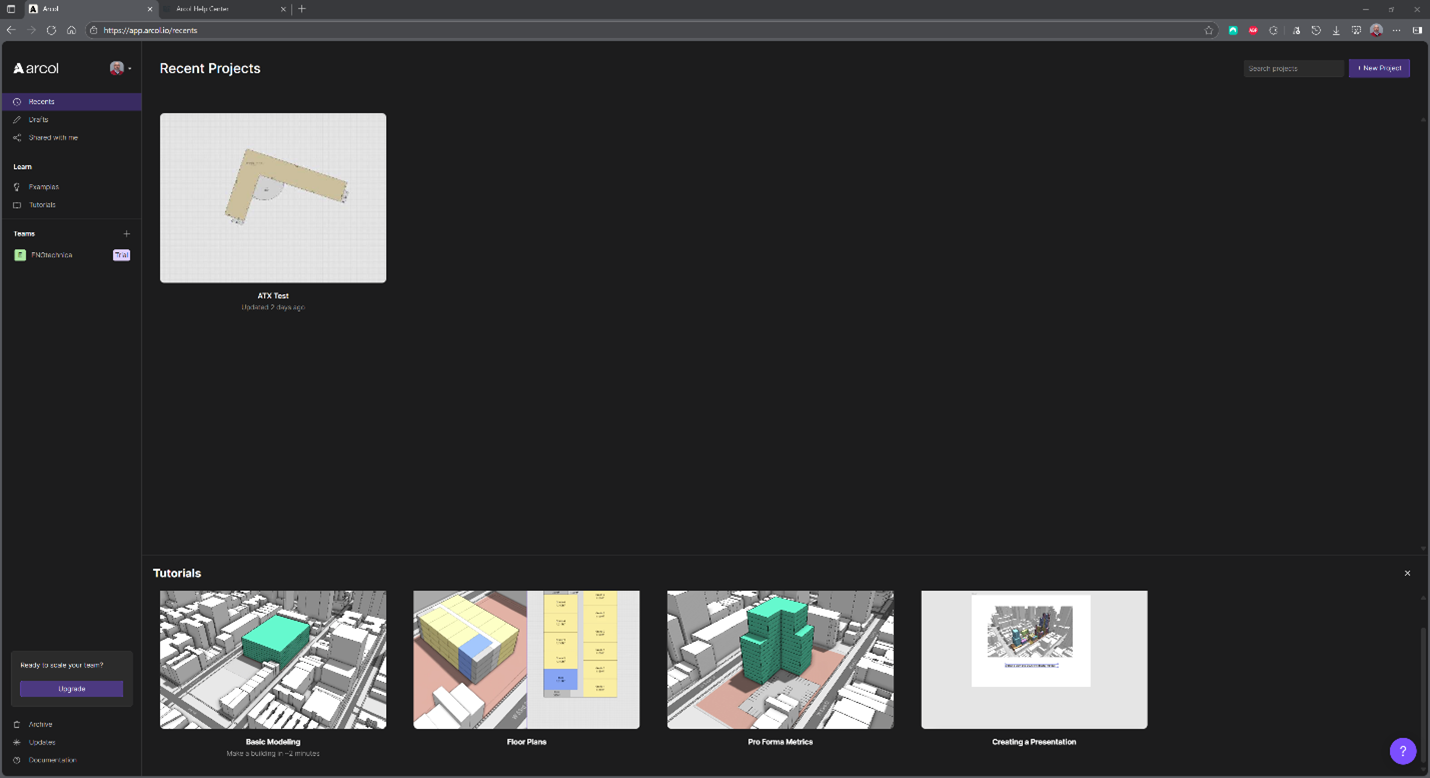
Each tutorial opens a sample project, sometimes prepopulated with content, and walks you through a variety of steps toward understanding the basics of “basic modeling,” “floor plans,” “pro forma metrics,” and “creating a presentation.” My impression? They are simple but maybe too simple. They are easy to follow and cover the basics but don’t really go far enough to provide a better understanding of how all things work for new time users. New user tutorials can often feel either too complicated or too simple.
This one errs on the side of simplicity, underscoring the power of the tools and the user’s ability. Perhaps the expectation is that users will discover more on their own, at their own pace. However, with new tools and platforms, as well as new ideas for workflows, having just a bit more handholding would be appreciated.
Arcol also utilizes Luma (lu.ma) for scheduling 30-minute, bi-weekly live demo webinars with Aaron and others, delivered via Zoom, targeting new users or curious investigators. When you initially sign up for Arcol and set up an account — even if it’s just a free trial — you’ll start receiving emails that point you to various online resources and register you for an upcoming scheduled demo webinar. Having such direct, early interaction is really great, especially when it involves multiple members of the Arcol team who can show different aspects of the platform and answer any questions attendees might have. However, like the tutorials, one 30-minute session is not enough. I’m not insisting on a hardcore, multi-session, multi-hour training program but find myself wishing for more depth to uncover more power and details, especially in modeling and pro forma metrics.
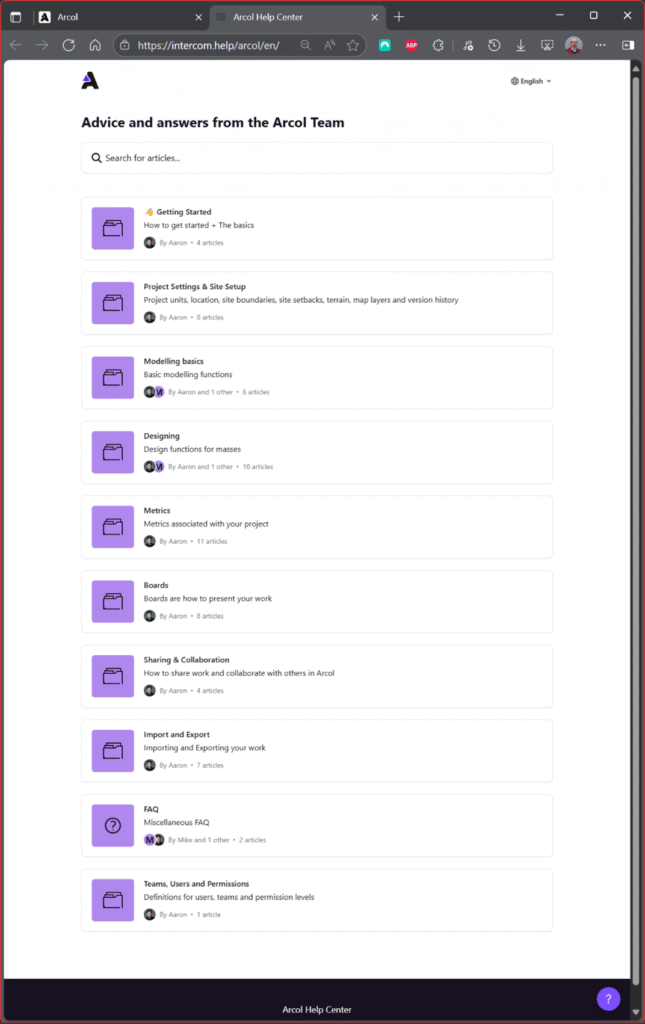
Arcol’s Help Center is an online user manual. Again, it’s simple to the point of belying the hidden complexity available to the user.
For example, consider the documentation for the ‘blocks’ entry. The Blocks page discusses creating sketches, such as unit floor plans, and saving them to your project library for reuse. However, the illustration doesn’t clearly show how this is done, nor is there a link to a video tutorial demonstrating the process.
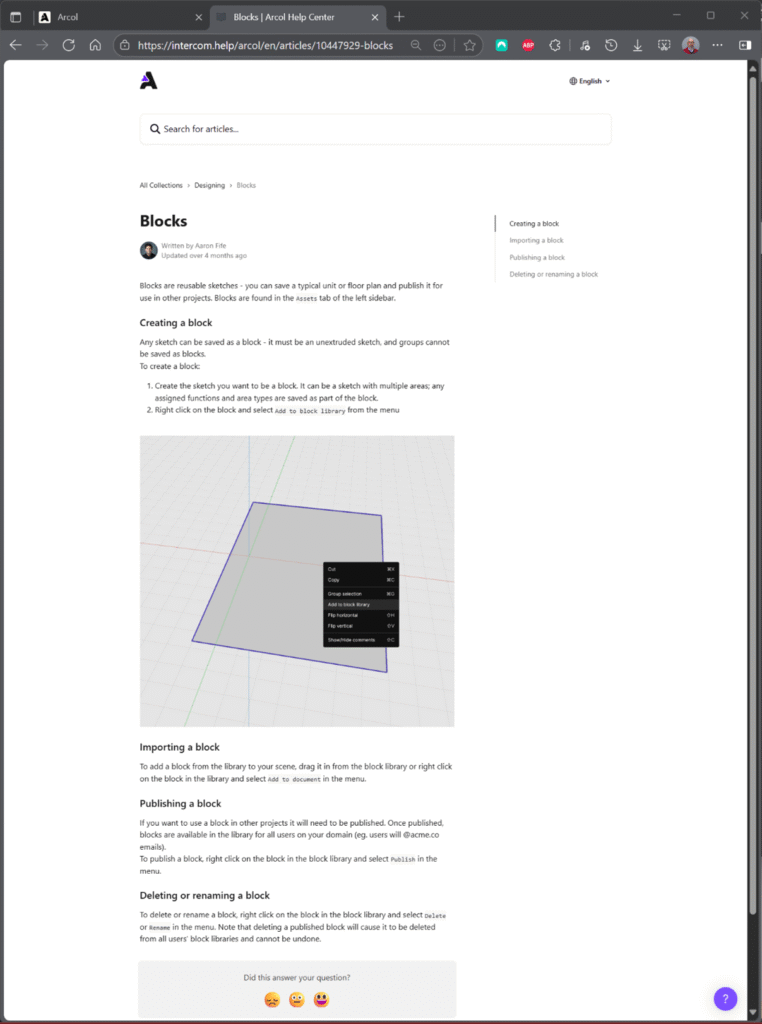
More detail would be reassuring to the user who is uncertain about implementing new commands, saving them from trial and error and the need to undo often. Ctrl+Z works to undo.
Project Setup and Modeling
Project setup is straightforward and well-documented, with a simple site search and selection dialog to begin your design. The Basic Modeling tutorial, as well as the demos and help center, cover this well.
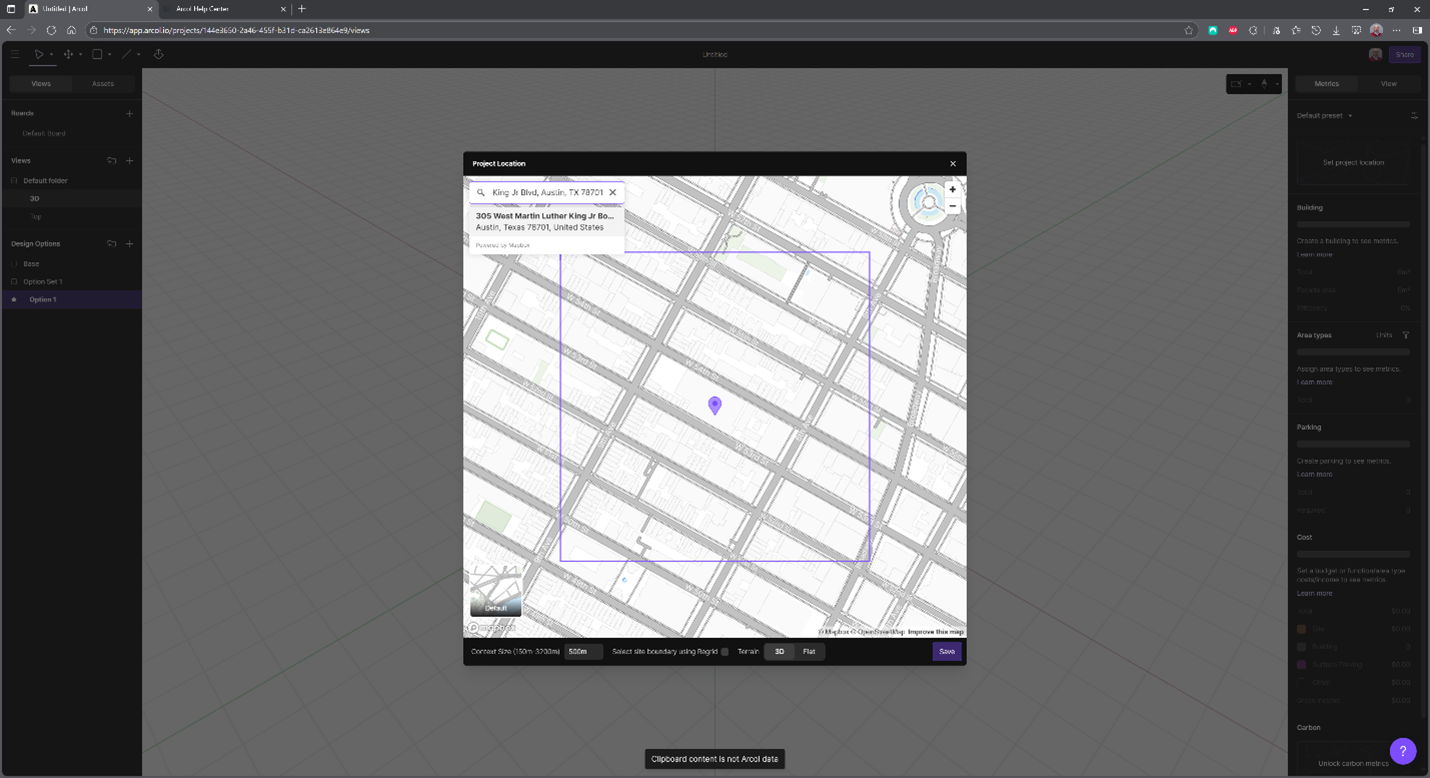
The desired existing site context is then imported, with the site plane, or 3D surface, and 3D building envelopes. Each building is selectable and can be relabeled or even deleted.
Your first “modeling” step after this is to create a site boundary. You’re not relying on snapping to the underlying map, as ROW and property boundaries aren’t immediately present (just road curb and sidewalk lines, along with existing buildings).
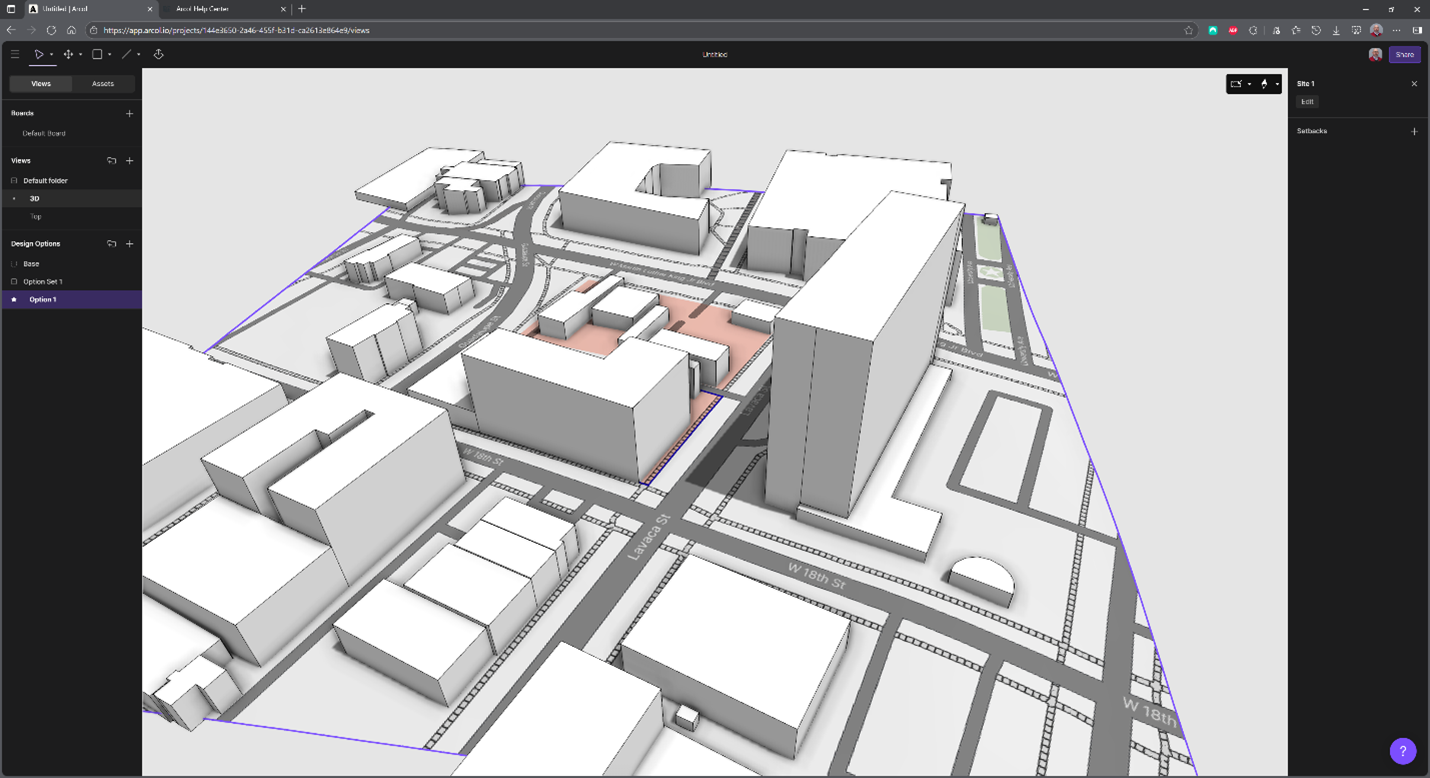
Modeling in Arcol is a mix of SketchUp and other older 2D/3D hybrid environments. There aren’t many drawing tools – Rectangle, Circle, Line and Arc – to create your schematic building footprint, along with push/pull, to generate the initial overall building mass. They function similarly to SketchUp. Before modeling spaces, you sketch a plan-based profile, which is automatically extruded based on your building floor metrics. Snapping and moving between the profile and the resulting view can be a bit tricky until you get used to it. The automated parametric dimensional constraints between lines are immensely useful for more precision. Be aware that you are performing basic mass modeling/spatial programming.
Currently, 3D geometry is generated through cubic extrusion from the plan sketch. There are no modes for sculpting the vertical planes of the resulting 3D geometry. In other words, you can have curves in plan but not a curved “roof” or vertically curved “wall.” You are also not modeling even schematic building systems, such as cladding or interior walls. It’s all about the earliest design step, where approximation of area measurements is coupled with detailed functional and cost metrics. And while there is the ability to control shadow casting via global illumination controls on the exterior context, you are not rendering anything with materials. Again, that is not usually an essential part of the feasibility phase.
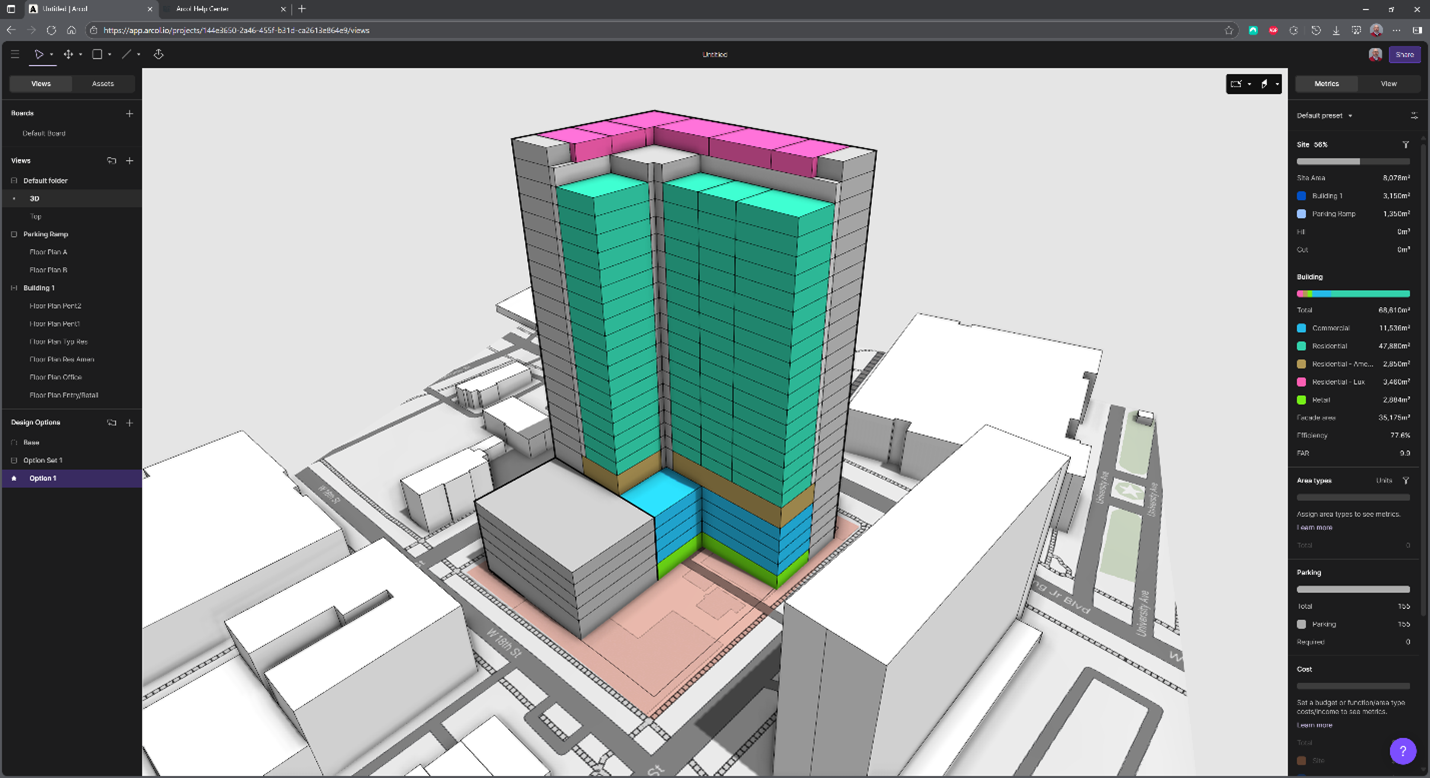
After a couple of hours, I end up with a mixed-use proposal (residential, small office, and retail). At this point, I haven’t delved into much detail regarding the functionality of spaces beyond taking the initial floor/story and delimiting the core (e.g., stairs and common services).
Parking is currently set up for surface lots, not multistory parking with ramps. While every urban jurisdiction is different in terms of parking requirements, structured parking is often a necessity. You can work around this by creating a parking ramp building with multiple parking function floors (the smaller, 5-story mass on the left). I wish for parametrics with a built-in ramp feature when spaces and lanes are distributed. Arcol does not yet have other site objects, such as sidewalks, drives, or landscaping, but you can easily add them manually with sketches.
Over the next couple of hours, I was able to refine the design and experimented with arcs (see below) for further improvement.
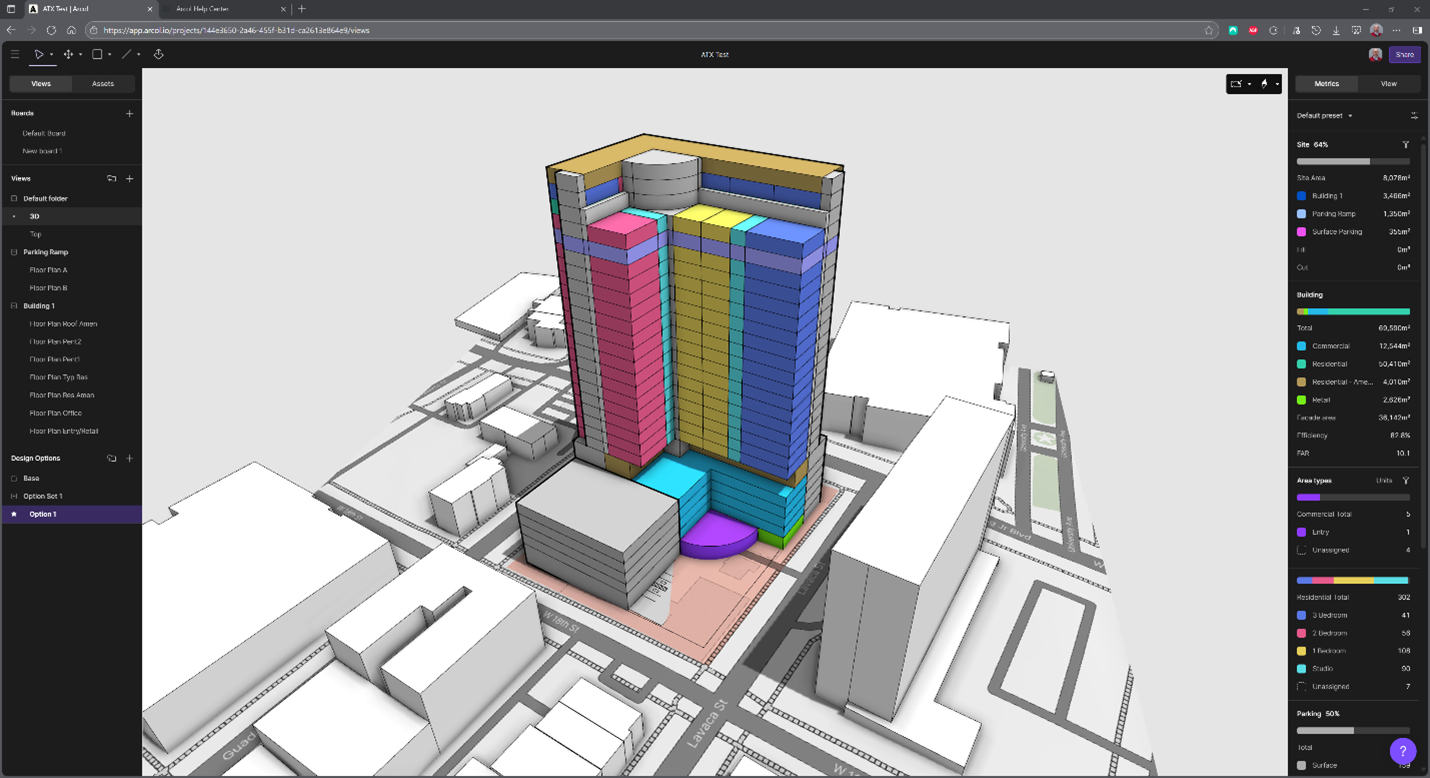
The 3D view, as shown above, is excellent for an overall view of what you are designing, but most of the time, users will spend their time in the Plan Views of the building:
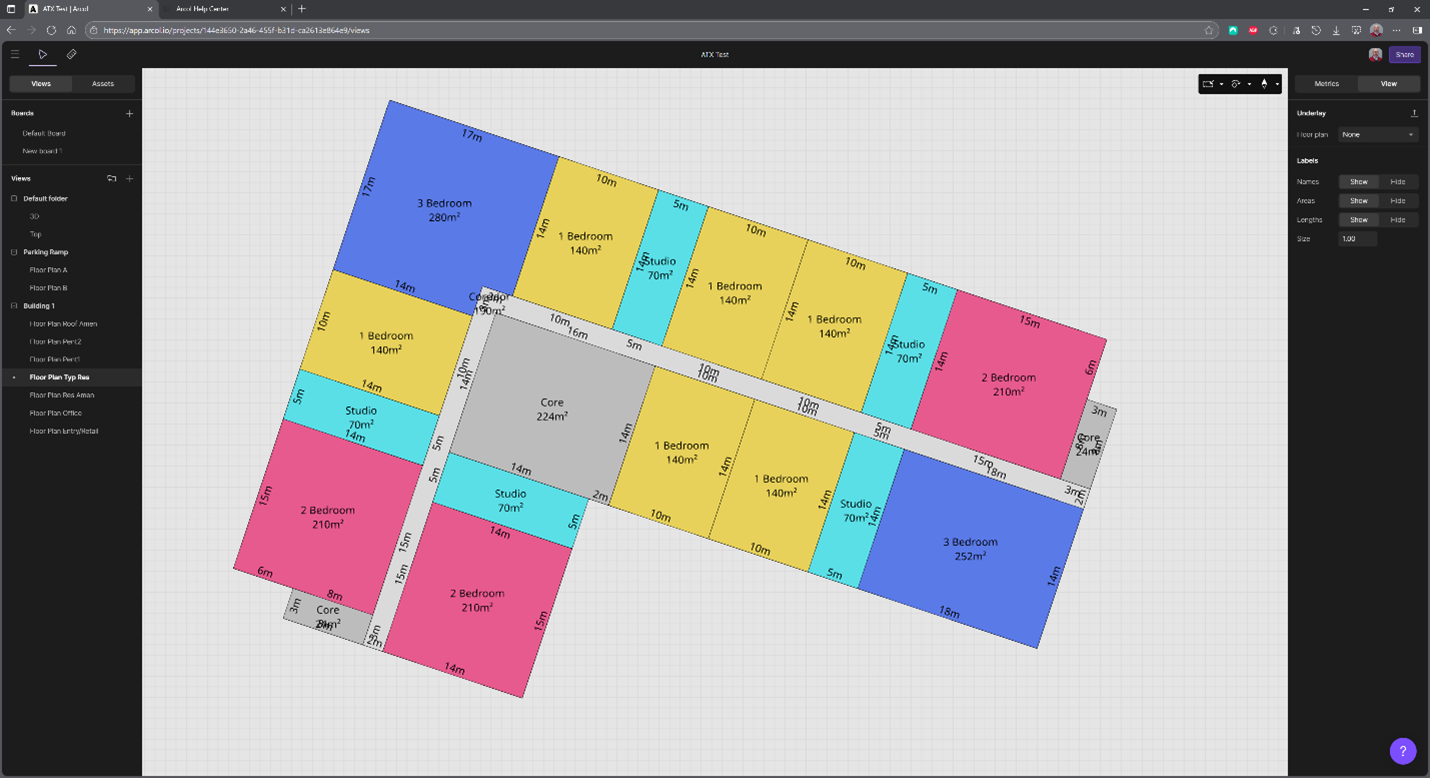
I wasn’t too worried about overly deep units in my floor plan at this point. The beauty of Arcol lies in its ability to continually refine these sketches and then have them automatically update across all the same building stories. You can also overlay other floor plans to provide a reference for properly aligning or resizing against.
Metrics
Arcol was able to demonstrate its ability to perform metrics quite well. The application’s UI/UX is remarkable. When looking at a project from a 3D view, you can hover your cursor over one of the building categories and it will render it in a solid color while ghosting the other parts of your design:
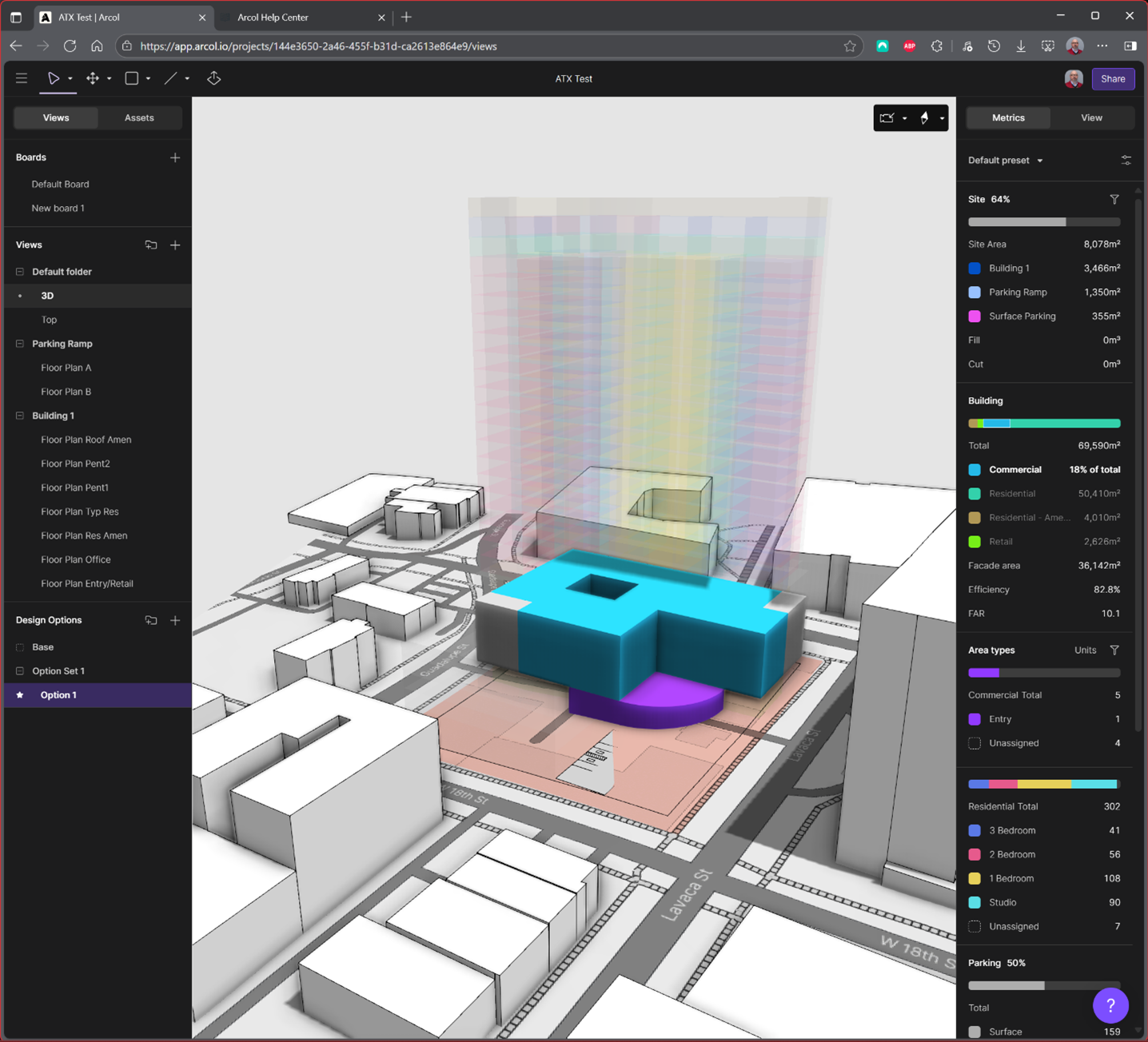
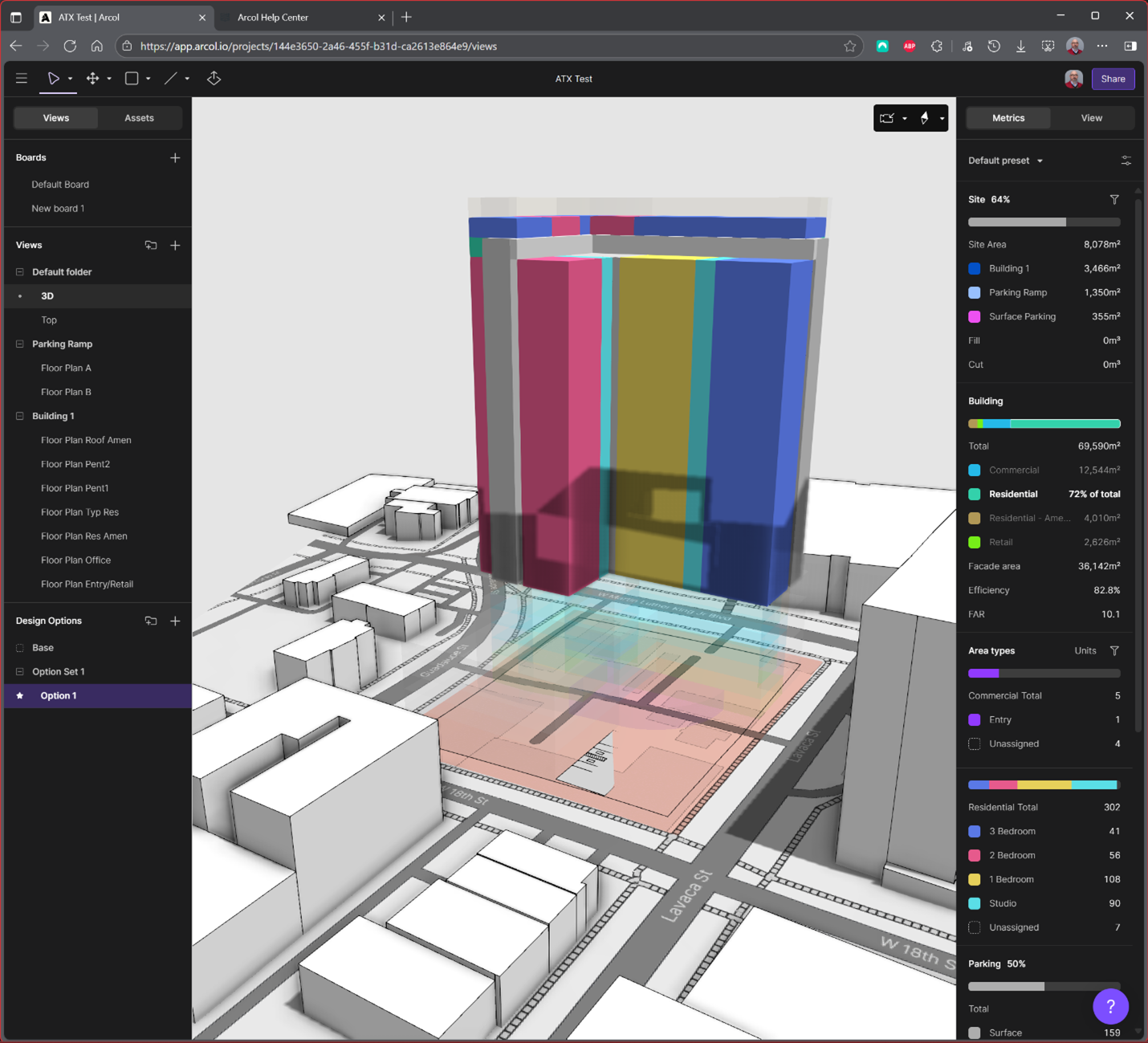
The residential category highlighted metrics are where Arcol shines, and those conducting feasibility studies will benefit from Arcol’s ease of use and ability to portray necessary information, allowing them to gain insight into their project quickly.
Presentations with Boards
Boards are a place where Arcol’s Help Center is much more complete, detailed and comprehensive. After only about 30 minutes, the presentation layout for the ATX Test design looks like this:
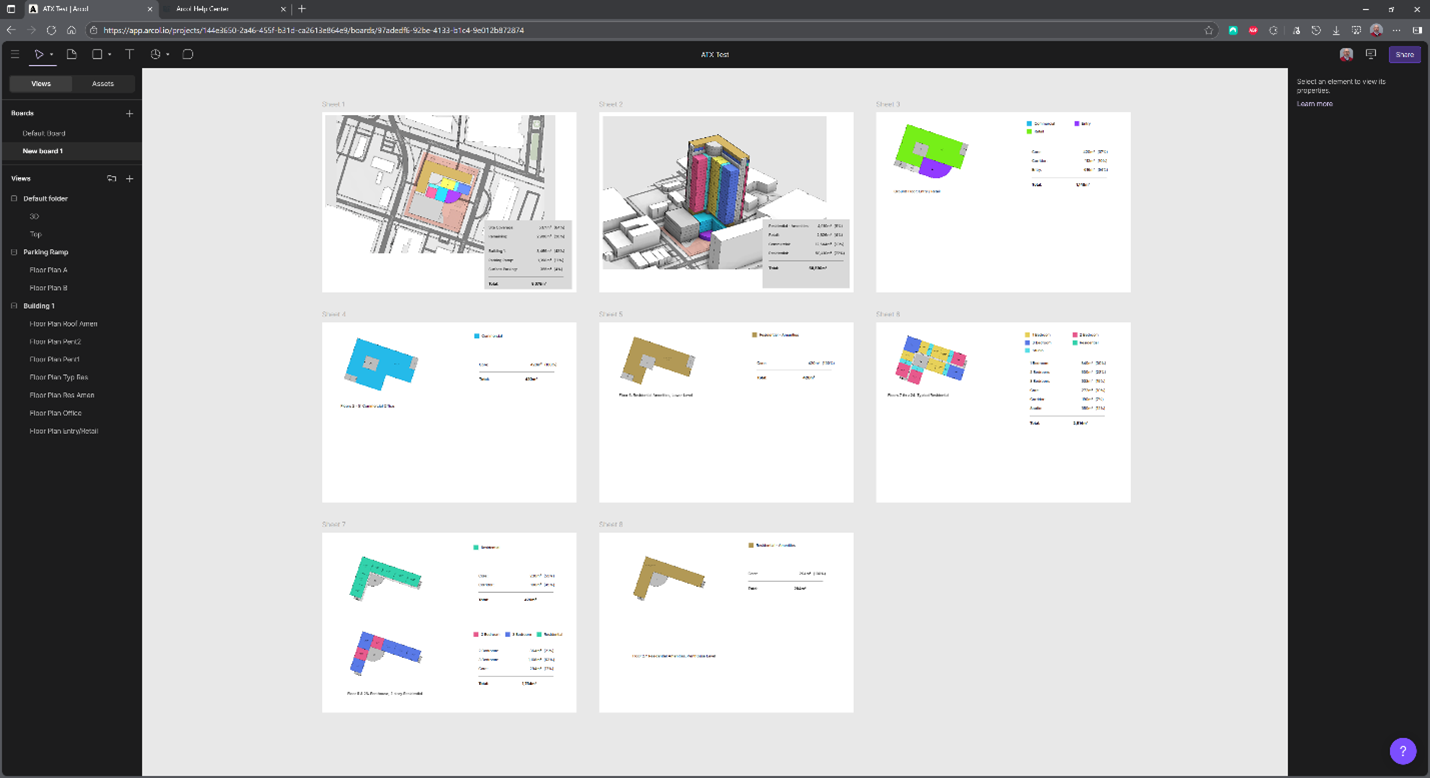
While the results aren’t pretty, given more time and effort, I could have transformed them into something worthy of a sales pitch to any inventor. The key idea was to get the crucial parts, graphics, legends and relevant metrics on a page to take inventory of what is there and what is still needed.
You can easily share the project with anyone, anywhere, and at any time, but the PDF remains the most common mode of sharing information. A PDF “snapshot” that can be distributed, whether via email, cloud storage, or hardcopy, is essential. Screen captures will not do. For that, there’s a Export to PDF button. It’s buried, though. You can uncover it with the “Open Presentation” which opens a new menu and interface… which then gives you the option to export the sheets to PDF.
Connecting with Other Tools
For Arcol.io, importing data is usually related to providing more detailed site context (PNG, JPG/JPEG, OBJ, FBX, STL, GLTF/GLB, IFC and 3DM) or more detailed site plan information (DWG/DXF), which can add precision to setting site boundaries and building locations not found from the default site selection and underlay maps. To share with the rest of the world, Arcol has developed an “Import an Arcol Project” plugin for Revit, which converts Arcol objects and geometries into native Revit objects and geometries via DirectShape, including masses, levels, generic floors, and walls. There are also STL (SketchUp) and GLB options for 3D geometry, as well as CSV files for metrics tables and JPG for images of models and presentations.
IFC is not currently an option and not on the roadmap, according to Aaron. The exchanges are based on customer feedback, where “99%” is based on Revit, according to Aaron. IFC hadn’t come up — until now. Other potential imports on their roadmap include other geometry authoring apps, such as Rhino, which has an enormous footprint for formal design in early feasibility and subsequent design development stages. Eventually, as Aaron indicates, Arcol aims to achieve “full collaboration” regardless of file formats, geometry, and platforms, but that takes time.
As an advocate for interoperability, particularly through the use of buildingSMART’s openBIM standard, Industry Foundation Classes (IFC), I advocate for IFC interoperability sooner rather than later.
Conclusions
Among the growing number of BIM 2.0 choices, why Arcol?
Arcol is definitely a tool aimed at firms, AEC, and/or design-developers that work on larger, commercial, institutional, multi-family residential or retail projects. But I wouldn’t restrict it by firm size. Arcol could also appeal to smaller firms, those with an appetite for technology that enables them to compete with larger firms. Arcol enables you to quickly and effectively create and close deals with a greater sense of confidence on both your part and that of your clients. And while Arcol is only at the beginning of developing a larger platform, there is significant value for many architects and developers in what is currently available with Arcol. It is simple, yet powerful, succinct, yet flexible. It is relatively inexpensive and offers a high ROI. That could be the end of the story, if not for the icing on the cake.
Arcol may not fully replace all the other tools in an office’s toolbox, but it offers an easy cost-value proposition. For $ 1,200 per user per year, it only adds $0.75/hr to an architect’s time, considering 1,600 billable hours per year. For that outlay, you get a platform that helps you quickly generate designs and metrics to close deals faster, with less effort, more design and presentation flexibility, power and more certainty. This means spending fewer resources on capturing the projects you really want to get.
It’s a low threshold for anyone to pick up and use Arcol, but at the same time, the user can also be more productive, and their work can be of higher quality. The graphics are clean, the boards are completely configurable to your firm’s style and graphic standards, and the modeling is simple yet flexible and powerful enough to generate compelling feasibility studies. Additionally, the interactive metrics always stay in sync with the design elements.
There aren’t any user-configured/custom parametrics to set up, nor a heavy-handed use of ML/AI overlaying your workflows to do a variety of things for you under the pretense of adding to its ease-of-use” factor.
Arcol easily integrates with tools you already have, leveraging workflows you already know. With the modeling simplicity of SketchUp and some of the parametric power of Rhino, the ease of communication of Miro and PowerPoint, and the data crunching capabilities of Smartsheet or Excel, Arcol offers a comprehensive suite of tools in one environment to address the crucial workflows at the beginning of a project. There is plenty of room to grow and improve, but you’ll be doing that alongside other Arcol users with direct input into what is needed and when.
And lastly, stated no better than Arcol’s website itself, “Collaboration is inevitable.” Why not use a platform built from the ground up for an inherently collaborative process?
About the Author

