NVIDIA Funds nTop to Develop OptiX Integration

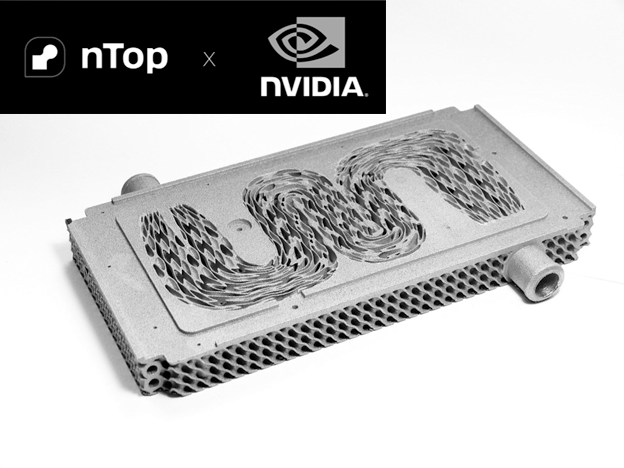
Heat exchanger made with nTop. Image: nTop

In what may be a significant leap forward for the visualization of computational design in the virtual world, nTop has announced a strategic collaboration with NVIDIA to integrate the latter’s AI-based OptiX ray tracing engine into its shape optimization program and NVIDIA’s Omniverse. The partnership is supported by funding from NVentures, NVIDIA’s venture capital arm. The amount of funding was not disclosed.

While Optix ought to improve the look of the rendered parts produced and the speed of the renderings of parts made by nTop’s computational design products and assemblies, the bigger play is NVIDIA’s Omniverse, which allows designers and engineers to interact with the digital twins of the parts and assemblies, all showing up rendered in the Omniverse without having to remesh them.

Background

nTop, previously known as nTopology, is an independent vendor of shape optimization software, a design aid typically offered within a CAD program. nTop’s last independent competitor, Frustrum, was acquired by PTC in 2018.

Staying independent seems to have worked for nTop, letting its mastermind, CEO and founder, Bradley Rothenberg, steer it toward motivated customers who can clearly benefit from the company’s next-generation design/simulation technology — rather than have it included in general-purpose MCAD programs and try to convince users they need it. nTop counts 400 companies as paying customers, including Lockheed Martin and Tesla.

The company received $65 million in funding in 2021, bringing its total funding to $135 million.

NVIDIA, the maker of GPUs, is currently at the forefront of the AI tsunami. Demand for its GPUs, which are used in data centers, has made NVIDIA the darling of Wall Street, pushed its stock sky-high, and made it the most valuable company in the world. Unlike most chip manufacturers, NVIDIA creates software that its chips can leverage, including OptiX, which uses AI to drastically reduce the time to produce photorealistic images, improving movie and game scenes and scientific visualization.

How nTop Plans to Use OptiX

The primary application of OptiX in nTop’s platform will be to produce real-time visualization. The OptiX framework is designed to fully leverage NVIDIA’s GPUs, enabling rapid rendering of parts, assemblies, and complex scenes. For nTop users, this means they can get instantaneous feedback on design changes. For example, in every design iteration where a part’s shape changes, its designers can see how these changes affect the model’s appearance in real time.

Tight integration between nTop and OptiX may eventually lead to the same parts and assemblies moving into NVIDIA’s Omniverse, all without having to be rendered again.

Streamlined Workflow and Efficiency

The integration of OptiX into nTop’s platform is not just about adding new capabilities; it’s about making the computational design process more efficient. By marrying ray tracing to computational design with OptiX, the user avoids having to remesh and have it rendered again when it enters the virtual world. With enhanced visualization and optimizations already applied in the real world, entry into the virtual world could be seamless.

Conclusion

NVIDIA’s OptiX could bring beauty to nTop’s brawn. Generative design and computational design programs have always been about how the parts perform, not about the way they look. While no engineer will admit they like how their products look, there is no doubt that a good-looking, realistic model adds to their sales appeal. Just as color changed our TV and movies, bringing the realism people back then thought they didn’t need.

Even if step improvements are gained at great cost (all those GPUs and server farms are not cheap), realism will always rachet up. And designers and engineers feel better about what they are designing. By offering accelerated simulation coupled with high-fidelity rendering, this collaboration could enable a more intuitive, efficient design process on the desktop and in the virtual world.

Hub Motors Work for Bikes, Why Not for Cars?

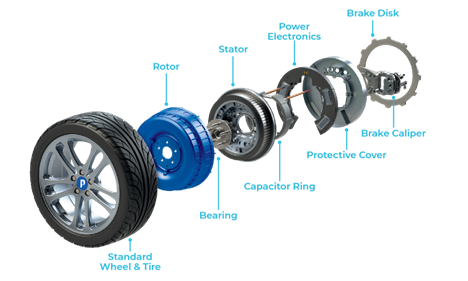
Direct drive. Protean’s wheel motors provide torque directly to the wheel. Image: Protean.

If you were to design the perfect electric car from scratch, you would have a motor in each wheel. An in-wheel motor, or IVM, saves mass (as much as 250 kg, according to SAE) by having no drive line, increasing the range (as much as 36%, according to Elaphe, an IVM manufacturer) and can get you in and out of tight spots (each wheel can rotate as much as 90 ° about the vertical axis). Embraced by a bicycle industry jolted into life, EVMs got little love from automotive designers. But recently, there has been a spark of hope. The leading IVM maker, Protean Electric, received the bulk of a $15 million award from the UK government—and priceless international attention—to further in-wheel power electronics.

Direct drive. Protean’s wheel motors provide torque directly to the wheel. Image: Protean.

Electrical vehicle design borrows much from conventionally powered vehicles: the motor under the hood connects to the wheels. The size of internal combustion engines and the attendant systems (fuel, cooling, lubrication, aspiration, and exhaust) dictated their placement. The electric motor has no such constraints. They are far more compact. You can place them anywhere. Why not put them right in the wheels? You could do away with crankshafts, drive shafts and differentials needed to transmit power.

A Little History

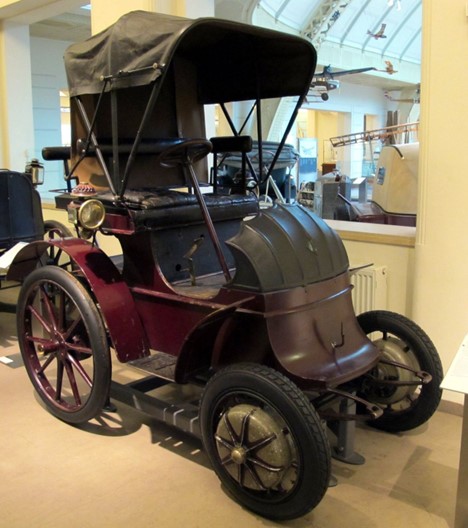
IVMs, or hub motors, are not an original idea. Credit for the invention of hub motors is spread among several inventors. One version was invented by Hosea W. Libbey in 1897. They were used in the earliest cars, such as the 1900 Lohner-Porsche shown above. They disappeared as the internal combustion engine gained popularity.

The IC engine became the mainstay, and it was only when battery technology’s specific power surpassed gasoline’s that its dominance was threatened.

Reinventing the Wheel

But even as an electric motor replaces the IC engine, its place in the vehicle’s center remains. Why? The auto industry offers several excuses. IVM-equipped wheels can’t handle high speeds. They are too expensive. They result in too much unsprung mass  – the mass of a vehicle that is not isolated, not protected from the road’s hard knocks by springs – certainly a valid excuse in the late 19th century when roads were best traversed by horses.

In the race to get new electric car designs on the road, the easiest and fastest approach would be to put the motors under the hood and leave the drive-train components in place. You could make a frunk from the unused space. Why reinvent the wheel? Electric car companies distributed the motors (Tesla to the center front and rear, Rivian one for each wheel), but none dared go all the way with motors in the wheels. Mercedes made a prototype of its vaunted SLS model with four near-wheel motors, but it never got into production.

What do Mercedes engineers know? Protean engineers have taken over the IVM challenge, flaunting IVMs on a Mercedes E-Series sedan. With over 350 patents, Protean may claim it is reinventing the wheel. Their story, as displayed on their website:

  1. IVMs Have Space Efficiency: By eliminating traditional driveline components like the gearbox, differential, and driveshafts, in-wheel motors free up significant space within the vehicle. This leads to more flexibility in vehicle cabin design, allowing manufacturers to optimize interior layouts for passenger comfort or increase space for batteries and cargo. [Or the extra room could be used for more batteries.]
  2. Improved Maneuverability. Each wheel in an IWM can be individually controlled, allowing for enhanced handling through torque vectoring. [IVMS almost 90 degrees, letting IVM-equipped vehicle enter a parking space sideways].
  3. Better Performance. Torque is applied directly, resulting in better stability, faster response time, improved cornering, and better driving dynamics.
  4. Greater Energy Efficiency: In-wheel motors are more efficient than traditional drivetrain systems because they eliminate power losses in differentials and driveshafts. Losing the drive line components also sheds mass [as much as 500 lbs, according to SAE], leading to longer driving ranges and reduced charging frequency.
  5. Enhanced Modularity and Production Efficiency: IWMs simplify the vehicle assembly process by reducing the number of required components, with IVMs essentially plug-in modules that include steering and brakes, thereby reducing development time and cost.
  6. Better Driving Experience: In addition to superior handling, IWMs enhance the overall driving experience by providing smoother acceleration, better road feedback, and more precise control. These benefits are achieved without noticeable drawbacks to ride quality from unsprung mass, as the impact on comfort is minimal for most drivers. [With this claim, Protean answers what may be the biggest criticism: more unsprung weight].

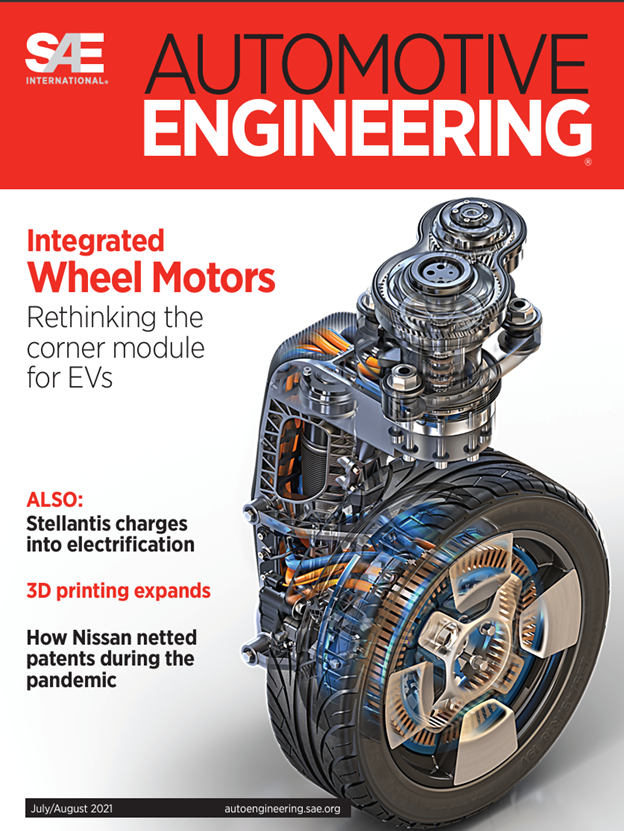
The automotive industry started to turn the page – literally — to IVMs in the 2021 issue of SAE (Society of Automotive Engineers), which put IVM on the cover and concluded with “the future looks promising for IWMs to revolutionize vehicle, design development, manufacturing and servicing.”

Local Motors for Local Motors

Olli was a great win for Protean. Unfortunately, Olli’s manufacturer, Local Motors, went out of business. Image: Protean.

Yet, no EVs are rolling off the assembly line on IVMs. The company’s biggest near-success was Local Motors, which integrated IVMS into Olli, a boxy, autonomous electric vehicle. Local Motors was a perfect platform for IVMs, as IVMs are literally local motors, and their vehicles, including one 3D-printed, became media darlings. Olli went into limited production and got some use as a shuttle, but remained a novelty. Local Motors ran out of money and went out of business in 2022.

A similar fate befell EV startup Lordstown Motor Corporation, which implemented in-wheel motors from Protean competitor Elaphe on its Lordstown Explorer pickup truck. However, the company went bankrupt after changing its name to Nu Ride in 2023.

Companies Developing IVMs

Protean Electric faces competition from several companies focused solely on developing and producing in-wheel motor technology.

Protean Electric and Elaphe are front-runners among companies that focus specifically on designing and developing in-wheel motors.

  1. Protean Electric (Surrey, England) has received $194 million in funding and employs 95 people.
  2. Elaphe, based in Ljubljana, Slovenia, has $4.9 in funding and between 100 and 250 employees.
  3. GEM Motors, also based in Ljubljana, Slovenia, has yet to disclose funding and is estimated to have 25-100 employees.
  4. e-Traction, based in Apeldoorn, Netherlands, also does not disclose funding and is estimated to have 25 to 100 employees.
  5. 5. Ziehl-Abegg, in Künzelsau, Germany, has 2,400 employees but a group devoted to IVMs.

Protean Electric Leads $15 Million Project to Put Motors in Wheels of EVs

Protean Electric, a manufacturer of in-wheel motors for electric vehicles (EVs), has announced the launch of Project PULSE (Power Electronics Upscale for Localization and Sustainable Electrification), an £11 million ($15 million) initiative funded by the UK government’s Advanced Propulsion Center (APC). The project aims to scale up the UK’s production capabilities for in-wheel power electronics, focusing on inverters and converters that are critical to EV technology.

Andy Otley, Head of Protean Electric’s UK Operations, emphasized the importance of this project: “Project PULSE is a landmark initiative that demonstrates our commitment to not only advancing electric vehicle technology but also to building a sustainable future for the UK’s automotive industry. By localizing the production of power electronics, we are taking a significant step towards reducing carbon emissions and creating a resilient supply chain.”

Project PULSE aims to address a key challenge in the automotive industry: the need for a domestic, sustainable supply chain for power electronics. The UK relies heavily on imports for many parts required for EV production. By developing a localized manufacturing capability, the project seeks to reduce the country’s dependency on foreign goods and, at the same time, enhance the UK’s industrial capabilities – all while helping address sustainability issues by helping produce

At the heart of Project PULSE is the establishment of a flexible manufacturing line for the motor that powers EVs. Protean Electric will lead this initiative in collaboration with a consortium of five industrial partners and UK universities.

Protean Electric’s in-wheel motor technology is set to play a significant role in the project. A motor/wheel integration could quite possibly be the next generation in EV design, overcoming the skateboard design standard for almost all EVs in production. The in-wheel motor promises increased efficiency and a lower overall cost of an EV.

While the economic effect of the project may be local, creating or safeguarding 159 jobs, the environmental effects will be national, reducing CO2 emissions by as much as 1.2 million tons annually and helping meet the UK’s commitment to achieving net-zero carbon emissions by 2050.

Protean’s collaboration with Coventry University and Warwick Manufacturing Group (WMG) aims to bring the latest research and development in power electronics to bear on the manufacturing process and, in so doing, push the UK into leadership in the global power electronics market.

Unipart Partners in $15 Million UK Power Electronics Innovation Initiative

Unipart Manufacturing to make a flexible power electronics manufacturing facility at its Beresford Avenue site in Coventry, UK. Image: Unipart Manufacturing.
Unipart Manufacturing is to make a flexible power electronics manufacturing facility at its Beresford Avenue site in Coventry, UK. Image: Unipart Manufacturing.

Unipart Manufacturing, headquartered in Oxford, UK, has announced its partnership in Project PULSE (Power Electronics Upscale for Localization and Sustainable Electrification), an £11 million ($15 million) initiative funded by the UK government through the Advanced Propulsion Center (APC).

The project, led by Protean Electric, aims to industrialize the assembly and manufacture of inverters and converters in the UK, involving a consortium of five industrial partners and two leading universities: Coventry University and the University of Warwick, AKA the Warwick Manufacturing Group (WMG).

Project PULSE seeks to accelerate the development and industrialization of advanced in-wheel motor and fuel-cell technology. This effort aligns with the UK’s objectives in sustainable energy and enhances the UK-based production capabilities. Unipart Manufacturing will establish a flexible power-electronics manufacturing capability at its Beresford Avenue site in Coventry.

The state-of-the-art facility at Unipart Manufacturing will focus on developing and producing high-power DC-DC converters and inverters. By leveraging advanced vision systems, flow management, and end-of-line testing, the facility aims to enhance both efficiency and quality in production. The project is anticipated to create or safeguard 159 jobs in the UK by 2030 and to save 1.2 million tons of CO2 annually.

Andy Davis, Business Development Director of Unipart Manufacturing, emphasized the project’s significance, stating, “This project underscores our commitment to driving innovation in the UK manufacturing sector. By collaborating with Protean, Viritech, and our academic partners, we’re not just expanding our capabilities; we’re also playing a crucial role in establishing a sustainable and resilient domestic supply chain for power electronics.”

Project PULSE’s objective is to deliver a flexible manufacturing line and develop a local supply chain while integrating low-carbon production methods. Collaboration with Coventry University and WMG will provide research and development to support industrialization and further the UK’s aspirations to be seen as a leader in power electronics manufacturing.

Carol Rose Burke, Managing Director of Unipart Manufacturing, highlighted the project’s broader impact: “This project is a testament to the strength of domestic manufacturing and our ability to respond to industry challenges with innovative solutions. We’re excited to contribute to an initiative that not only advances power electronics technology but also supports the UK’s journey towards sustainable electrification.”

Unipart Manufacturing employs 800 engineering experts and supply chain specialists in Coventry and Portsmouth, UK.

SOLIDWORKS Jumps Ahead to 2025 Version, Adds Ultimate Package

After seeing so many releases during his time with the venerable MCAD program, what could excite Manish Kumar? Kumar, CEO of SOLIDWORKS for over two and a half years, started with SOLIDWORKS as a software developer in 1999. He may not be coding anymore, but he still keeps both hands on the software, using every excuse he can muster to use the program, such as modeling his house or desk. As a user, he can hold his own, earning the Certified SOLIDWORKS Professional (CSWP) award, which only 3% have.

SOLIDWORKS 2025 does not add all that much in the way of big feature enhancements. But we can make it faster and help you work better with others, says Kumar. He does indeed point out a handful of feature enhancements, but what excites him the most is the speed and collaboration enhancements and a new high-end package, SOLIDWORKS Ultimate

How much would that be? If you are asking, you probably can’t afford it. Expect it to cost significantly more than SOLIDWORKS Premium, which sold for $8,395 (perpetual license) or $4,848 a year.

Here is a more detailed list of what excites Manish the most about SOLIDWORKS 2025 based mainly on a post attributed to him on the SOLIDWORKS blog.

1. Platform Collaboration and Performance

One of the most significant themes in SolidWorks 2025 is enhanced collaboration through platform integration. The update introduces features that make it easier for teams to work together on complex projects. Real-time notifications and multi approval timestamps are meant to allow users to track project status and approvals efficiently. These enhancements aim to streamline workflows, ensuring that all stakeholders are up-to-date on project developments. Kumar emphasizes that the goal is to “deliver a seamless customer experience” by focusing on performance and integration.

2. Selection Accelerators

A complex design often involves selecting multiple components or features for fillets or chamfers. This can be time-consuming. SolidWorks 2025 addresses this by introducing Selection Accelerators, allowing users to make more automatic selections. Selection Accelerators could increase design process efficiency by providing options to select similar items based on criteria like size, location, or feature type. Kumar mentions that this feature “accelerates the design process,” allowing users to focus more on creativity than routine tasks.

3. New History Tab

The new History tab in SolidWorks 2025 provides a detailed timeline of all changes made to a model. This feature lets users see who made changes and when making it easier to track the design process and identify potential issues. The History tab is not just a record-keeping tool; it’s essential for maintaining design integrity and ensuring all team members are on the same page.

What 4. Enhanced Plastic and Sheet Metal Design
SolidWorks 2025 introduces enhanced plastic and sheet metal design tools, catering to industries where these materials are prevalent. The update offers more control over design elements, such as wall thickness, rib design, and bend allowances. According to Kumar, the improved tools aim to “provide more flexibility and precision” in designing components.

5. Interference Detection in Large Design Review Mode


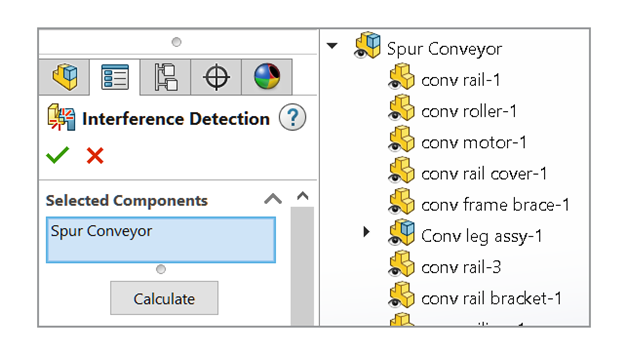
Large assemblies can be challenging to manage, especially when detecting interferences. SolidWorks 2025 addresses this with an enhanced interference detection feature in Large Design Review mode. This feature allows users to identify and resolve interferences in large assemblies without opening the entire model, saving time and computational resources. This enhancement is crucial for industries that work with complex assemblies, as it helps to “ensure that the final product is free of errors,” as Kumar puts it.

6. SOLIDWORKS Ultimate Package

Kumar introduced the SOLIDWORKS Ultimate package, which eclipses the SOLIDWORKS Premium package by adding more collaboration, simulation, and manufacturing features and capability. The Ultimate package provides access to advanced features such as simulation, electrical design, and manufacturing planning, all within a single platform. This integration aims to provide a “one-stop solution” for designers and engineers, reducing the need for multiple software tools. See the complete feature comparison in a PDF here. Pricing for SOLIDWORKS Ultimate was not available.

7. Real-Time Collaboration Tools

SOLIDWORKS 2025 introduces several enhancements to improve collaboration. One key feature is the ability for file-sharing participants to add comments directly to each shared file, facilitating better communication
with external users. This can be enabled through the “Collaboration Options,” allowing external users to contribute comments and even replace internal usernames with generic names for privacy on the shared file page. Additionally, SOLIDWORKS provides options for a multi-user environment, including enabling a read-only mode to check if other users have modified files. This ensures that changes made by others are detected and communicated, helping avoid conflicts during collaborative work

8. Improved Performance and Stability

Performance and stability are always a priority in software development and SolidWorks 2025 is no exception. The update includes various under-the-hood enhancements that improve the software’s responsiveness and reduce the likelihood of crashes. These improvements are particularly noticeable when working with large assemblies or complex models, providing a smoother user experience. Kumar notes that these performance enhancements “make SolidWorks more reliable and efficient.”

9. Advanced Simulation Capabilities


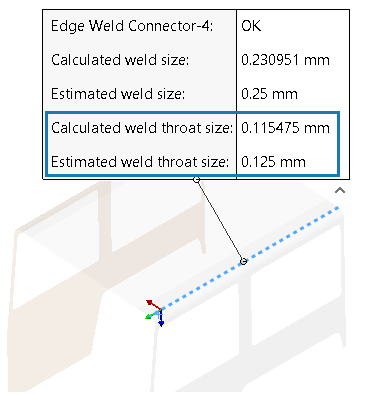
In SOLIDWORKS Simulation 2025, there are notable advancements aimed at enhancing the simulation process. Bonding interactions now handle offset surfaces more effectively, ensuring more precise results. The edge weld and pin connectors have been refined for improved accuracy. Users can also exclude multiple bodies from analyses, making simulations more efficient. A new general spring connector has been introduced to accommodate a variety of surface connections. Additionally, surface bonding improves
geometry correction, reducing meshing times for assemblies with multiple identical parts.


The Future of Engineering: Harnessing AI with Kevin Surace

The following is an article based on an episode of the Being an Engineer podcast series by Aaron Moncur, edited and published here with permission.

In the ever-evolving world of engineering, the integration of artificial intelligence (AI) is no longer a distant concept confined to science fiction. It’s here, and it’s changing the way engineers approach design, problem-solving, and innovation. In this episode of the Being an Engineer podcast, we sat down with Kevin Surace, a renowned innovator, futurist, and AI expert, to discuss the immense potential AI holds for the engineering profession. Kevin’s insights not only reveal the capabilities of AI but also how engineers can strategically use AI tools to transform their work and the industries they serve.

‍A New Era of Engineering: AI as a Strategic Tool

Kevin Surace opens by emphasizing that AI is much more than a buzzword—it’s a powerful tool that engineers can leverage to achieve unprecedented levels of efficiency, creativity, and precision. “AI is not here to replace engineers,” Kevin explained, “but to augment human intelligence, providing new ways to tackle complex problems that were previously insurmountable.”

Surace highlighted how AI can process vast amounts of data quickly, identify patterns, and make predictions that would take human engineers exponentially more time to discover. In fields like civil engineering, mechanical design, and manufacturing, AI’s ability to analyze data sets enables faster decision-making and more informed choices, from the design phase all the way to execution.

For instance, in mechanical design, AI can simulate hundreds of prototypes within minutes, optimizing variables such as material selection, geometry, and stress. Engineers no longer need to rely solely on iterative physical testing, which can be time-consuming and expensive. AI enables them to rapidly refine designs virtually, reducing the time to market and driving down costs.

‍The Role of GPT in Engineering

One of the fascinating technologies Kevin focused on during the discussion was GPT (generative pretrained transformer), the same AI model behind tools like ChatGPT. He pointed out how GPT models, traditionally seen as language processors, have immense potential in the engineering space. Beyond generating text, these models can understand and predict patterns within complex systems, provide insights into design options, and even assist with troubleshooting issues in real-time.

“Imagine you’re working on a design for a new bridge,” Kevin illustrated. “You input your parameters into an AI-powered GPT tool—length, load capacity, materials—and within moments, it generates several structurally sound designs based on historical data and real-time simulations. It’s like having a brainstorming partner that never runs out of ideas and works 24/7.”

‍He added that GPT could become a real asset when it comes to documentation, one of the most tedious but critical tasks engineers face. AI can now auto-generate technical reports, specification documents, and even predictive maintenance guidelines, which frees up engineers’ time to focus on high-level creative problem-solving.

‍Kevin also highlighted AI’s ability to detect anomalies in datasets or systems, which makes it a valuable partner in industries where safety and precision are paramount, such as aerospace or biomedical engineering. AI systems can monitor vast amounts of sensory input, flagging potential issues before they become catastrophic failures—something human engineers simply can’t achieve with the same speed or precision.

‍AI in Manufacturing: Efficiency and Customization at Scale

Kevin, a key player in developing AI for industries like manufacturing, touched on how AI is revolutionizing the production line. “Automation has been around for a long time, but AI-driven automation is a game-changer,” Kevin noted. Traditional automation systems are rigid—they follow pre-programmed steps without the flexibility to adapt to new variables. AI, however, brings adaptability and intelligence to automation systems.

‍One of the most exciting uses of AI in manufacturing is predictive maintenance. “With AI, machines can essentially ‘tell’ you when they are about to fail,” Kevin explained. “By analyzing vibration patterns, temperature changes, and performance metrics, AI systems can predict when parts will need replacement before they break down, minimizing downtime and preventing costly equipment failures.” This proactive approach to maintenance can save companies millions of dollars and vastly improve production efficiency.

‍Additionally, AI has ushered in a new era of customization in manufacturing. Kevin illustrated how, through AI systems, manufacturers can produce highly customized products on demand, adjusting designs and production processes in real time to meet the specific needs of individual clients without sacrificing efficiency. For example, automotive manufacturers can now offer more custom-built features without slowing down production, thanks to AI algorithms that optimize each stage of the build process based on the customer’s unique specifications.

‍Bridging Creativity and Engineering with AI

A common concern that engineers might have is the misconception that AI’s involvement could reduce the need for creative problem-solving. Kevin, however, sees it differently. AI doesn’t replace human creativity—it enhances it.

‍“AI allows engineers to focus more on the ‘what ifs’ rather than the ‘how-tos,’” Kevin elaborated. “For example, engineers might spend hours running simulations or creating models manually, but AI can automate those tasks, providing more time for engineers to explore innovative solutions and think outside the box.”

‍Kevin stressed that AI doesn’t think in a vacuum—it feeds off the data it’s given. Human engineers are still responsible for defining the parameters, identifying the goals, and ensuring that AI-driven solutions are aligned with the project’s objectives. AI can suggest solutions that humans might not immediately think of, but it’s the engineers who validate and refine those ideas.

‍A prime example Kevin mentioned is in the realm of architecture and building design, where AI can suggest more sustainable construction methods, identify the optimal placement of energy-efficient materials, or propose architectural designs that maximize natural light—all based on data analysis of thousands of previous designs.

‍AI and the Human Element: Building Better Collaboration

While AI can process more data and simulations than any individual engineer, Kevin made it clear that collaboration between humans and AI is the real key to unlocking the full potential of this technology. He coined the term “augmented intelligence” as opposed to “artificial intelligence” to emphasize this point. “AI is most effective when used to augment human decision-making rather than replace it,” he said.

‍Engineers still bring to the table elements of intuition, creativity, and ethical consideration—qualities that AI, at least for now, cannot replicate. In fact, engineers must play a critical role in ensuring that AI systems are applied ethically and responsibly. For example, when AI tools are used in safety-critical environments, human oversight is crucial in making sure that decisions made by AI align with regulatory standards and human values.

‍Kevin also discussed how AI can foster better collaboration within engineering teams. AI tools can act as intermediaries that analyze feedback, data, and input from various team members, allowing everyone to work more cohesively. This becomes especially important in large, distributed teams working across different time zones, as AI systems can centralize communication, offer solutions to issues that arise, and keep track of project progress—all in real-time.

‍“AI can be the glue that holds these large, distributed engineering teams together,” Kevin emphasized. “It bridges gaps in knowledge, communication, and workflow, ensuring that everyone has access to the latest insights and data to make informed decisions.”

‍Ethical Considerations and the Future of AI in Engineering

A key part of the conversation delved into the ethical implications of AI in engineering. Kevin is acutely aware of the challenges that come with AI, particularly regarding transparency, accountability, and bias. AI systems are only as good as the data they are fed, and if that data is biased or flawed, the AI’s recommendations will reflect those biases.

Kevin warned that engineers need to be vigilant about the data they are using to train their AI systems. “Bias can creep in, often without us even realizing it, especially in industries like healthcare or hiring, where AI is increasingly being used,” he explained. Engineers must carefully audit and validate the data sets they use, ensuring that AI systems operate fairly and inclusively.

‍Looking ahead, Kevin sees AI continuing to evolve, with more sophisticated models emerging that will blur the lines between human and machine capabilities. One exciting frontier is AI’s role in adaptive learning. AI systems are beginning to not just follow orders but learn from their interactions with engineers and other systems, becoming smarter and more attuned to specific problems.

‍However, Surace also predicted that as AI becomes more integrated into engineering practices, there will be a growing need for engineers who understand how to work with AI—those who can not only use AI tools but also build, train, and troubleshoot them. In this sense, AI isn’t reducing the need for engineers—it’s changing the skills that engineers will need to thrive in the industry.

‍Embracing the AI Revolution

As the podcast concluded, Kevin left listeners with a powerful message: engineers shouldn’t fear AI—they should embrace it. AI is rapidly becoming an essential tool in the engineering toolbox, one that, when used effectively, can elevate the quality of work and unlock new possibilities.

“We’re at the beginning of an exciting era,” Kevin said. “AI is going to change how we work, how we create, and how we think about engineering problems. But at the heart of it, engineering will always be about human ingenuity. AI is just the next step in that evolution.”

For engineers who are curious or even apprehensive about AI, Kevin’s advice is clear: start experimenting with AI tools now. The sooner you familiarize yourself with how these systems work and how they can assist in your daily tasks, the more prepared you’ll be for the future of engineering—a future that is undeniably intertwined with artificial intelligence.

‍Connect with Kevin Surace on his LinkedIn profile.

Get more Being an Engineer Podcasts here.

Shapr3D the First CAD Program Inside Apple’s Vision Pro

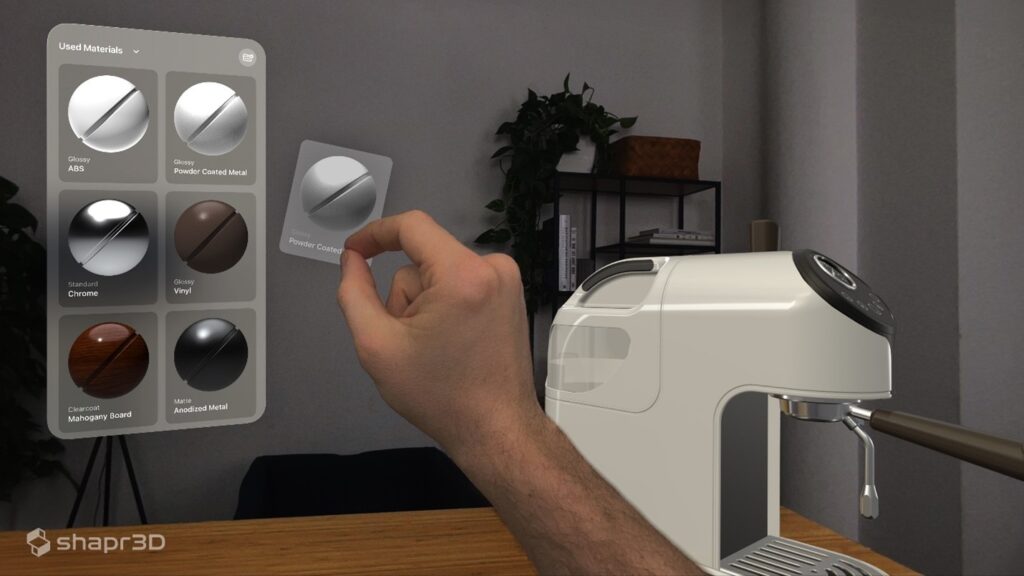
Pinch and grab. Shapr3D implementation of Apple Vision Pro uses a pinch motion to select. Image: Shapr3D.

Leave it to Apple to come up with the best AR/VR headset on its first attempt. Then comes Shapr3D announcement that they are implementing the Apple Vision Pro. We should not be surprised. This brilliant little CAD company is bent on making CAD more natural. They did that with an Apple iPad and Pencil UI in 2018, which remains to this day the most natural UI ever developed for a CAD program. With the Vision Pro, they free the designer from the flat screen and immerse them in a virtual reality.

We are introduced to the new Apple Vision Pro by István Csanády, CEO and founder of Shapr3D at a special event in what will be the company’s hew Budapest headquarters.

“As the founder of Shapr3D, my vision has been to create an adaptive, cross-platform CAD tool for seamless collaboration in product development,” says István Csanády in the accompanying press release. “With Vision Pro, we’re achieving a milestone in realizing this vision, enabling you to not only design but to edit directly in CAD on Vision Pro. And we didn’t stop there. We’ve integrated extended reality design reviews into the Shapr3D ecosystem to seamlessly pick up on any device, transcending traditional boundaries and enhancing productivity. It’s the next step toward our goal of making CAD collaboration accessible to everyone, regardless of their platform or location.”

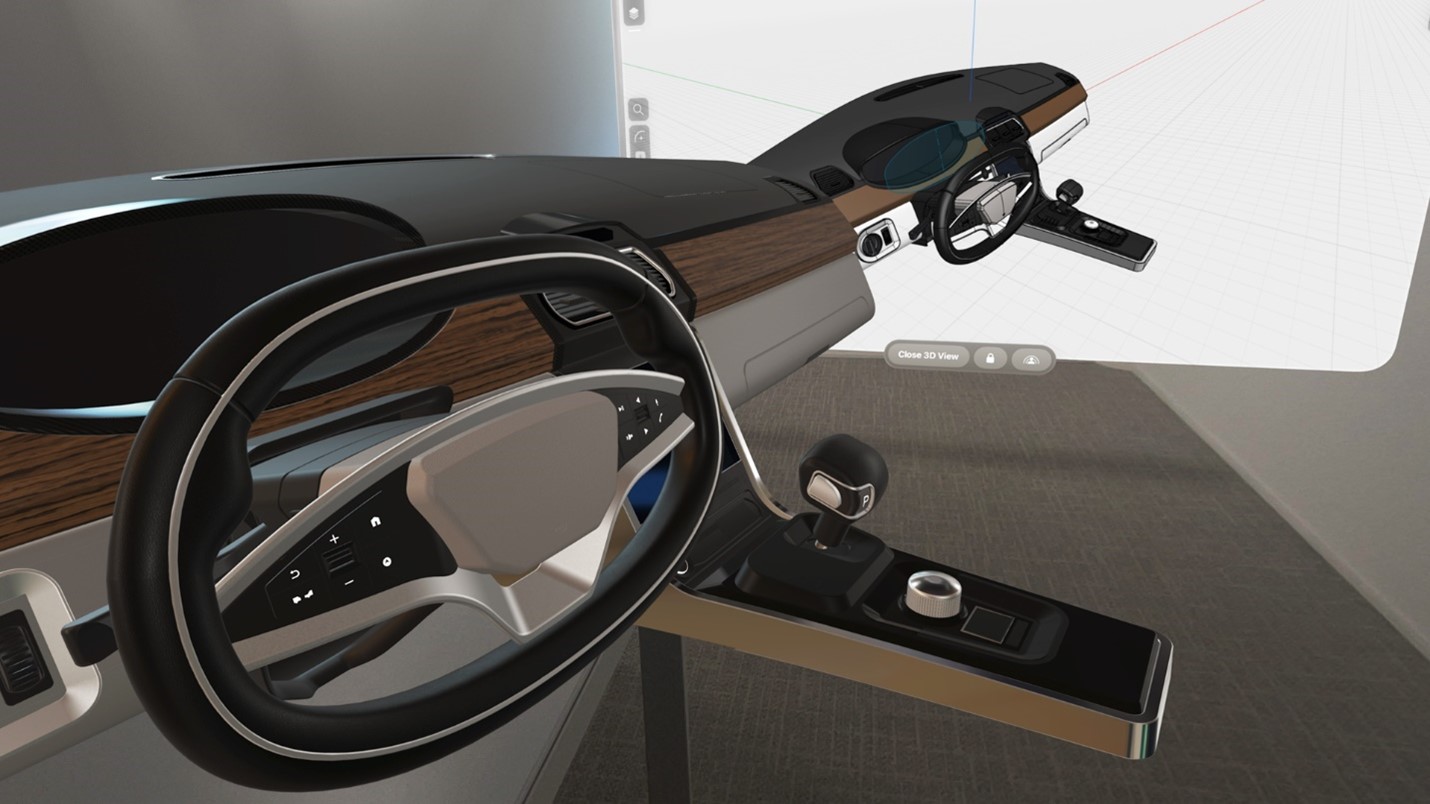
Interior of vehicle as seen with a Vision Pro.

We are treated to a live demo which mimics two designers collaborating on a design. Projected on the screen is the view from inside a Vision Pro headset of an automobile center console being designed. We see it on a flat screen but the designer is immersed in a virtual world with a scale model of the design in the room. We have to imagine the scene playing out in a car. He picks up the design on a computer to add detail and make changes. The transition from VP to computer is immediate and seamless. There are no glitches, blue screens of death or sweaty armpits – as far as any of us can tell.

Shapr3D, unlike Onshape, runs locally (on your computer or device) and can sync with a model on the cloud so it feels as if everyone collaborating is accessing the same model. Onshape, which runs and stores models on the cloud needs no syncing – everyone is accessing the same model, AKA a single source of truth. It is a distinction without a difference, however, as the syncing takes less time than putting down one device and picking up the other.

Shapr3D sees the Vison Pro headset as part of a workflow that involves multiple devices, each suited for the task at hand. A designer can conceptualize on a tablet with a pen-and-paper-like interface. They can detail the design on MacBook Pro or a Windows-based workstation. They can try it on for size with the Vision Pro.

The suggested workflow seems ideal for a design studio, particularly automotive design studios, which are likely to support both iPad Pros and Pencils, MacBook Pros for all and have them all share a Vision Pro.

‍Try It, You’ll Like It

‍We all got a chance to try on the Vision Pro and see for ourselves. Those that had tried other VR headsets on the market had to admit the view inside the Vision Pro was stunningly good by comparison. With 4K resolution per eye, it matches the state of the art Varjo XR-4. Because of the high resolution and brightness, the Apple headset is able to show textures as fine as the pebble grain on leather of an automobile interior and deep rich colors of Shapr3D’s physics-based rendering. Latency, a common cause of nausea, is indeed minimal. We would not get sick, we were told. However, one attendee did still find it disorienting though not to the point of asking for a vomit bag.

Unlike the first VR headsets on the market that tethered you to a workstation with wires (AKA, an electric ponytail), the Vision Pro is wireless—save one wire attached to a battery. Without the power from a workstation, it must have a battery. That’s okay. The battery is small enough to slip into your pocket and leave you free to move about the room.

You would not want to move about the room with a 1st generation VR headsets even if you could. A step in any direction and you could trip over the furniture. Rooms set up for VR had to have headsets with long ponytail, be free of obstruction and have a spotter to keep you from walking into the workstation or the walls. The outward facing cameras on the Vision Pro can show you the room that prevent you from walking into anything. You can also interact with people around you.

You put on the Vision Pro, tighten the fabric headband, and the headset configures itself for your eyes so it can do eye tracking, which it does in lieu of a mouse and cursor. You look at icons or checkboxes, which give the slightest glow to indicate they are being seen. You do a thumb-finger pinch movement in front the headset, which the device interprets a selection, as you would click a mouse button. It must get easier with practice. I find myself yearning for the simplicity and precision of a cursor and a mouse.

‍Shapr3D leads the field with the types of computers and devices it can run on. It made its debut on an iPad, runs on MacBooks, was ported to Windows-based PCs and now, runs in the Apple Vision Pro.

It may seem odd to pair a $38/month program with hardware that costs almost ten times what you pay for the program monthly, but in another way, you can see where Shapr3D is going with this rather high-end device:

  • The Vision Pro could be a big hit, giving Shapr3D cachet, kudo — and first mover advantage
  • It helps establish Shapr3D with big manufacturers, such as automotive design studios and heavy equipment manufacturers, which had in the past made would employ VR CAVEs, whole rooms with images projected on walls, that cost between $100K and a million.

‍Does it matter that the Vision Pro has a price tag of in the thousands ($3499) when a flat screen can be had for hundreds of dollars? Give us technology we love, and cost is no object. CAD cost thousands when drafters’ tools (lead holders, T-squares, drafting table…) cost hundreds. The iPhone costs over a thousand when  cell phones cost hundreds. The Model-T debuted  with a $850 price tag, the price of two horses.

It remains to be seen if Apple Vision Pro will be one of those gotta-have-it products. There are still a few barriers to the Vision Pro and VR in general that stack up against it and be too high to jump over:

  1. ‍You can’t wear glasses. If you don’t have contact lenses or don’t want to be bothered with them, you have a problem.
  2. Headsets are still bulky. You can’t wear them all day.
  3. Expensive
  4. Software UIs are still developing. The best eye tracking is still imprecise compared to a mouse and cursor. You can’t push and pull objects like you could with a touch screen.

‍I’m sure the UIs will get better. Perhaps a cursor to confirm your direction of sight. And the selection of solid objects with the cursor and a double blink? You wouldn’t look goofy pinching the air. With clash detection, you should not be able to walk or wave through objects. Perhaps some feed back, like a buzz or haptic feedback gloves?

‍Still, there has been no better time to get into VR, now that Apple has a device for it. The company has a way of introducing the future.  And Shapr3D, the original iPad CAD program, is all in.

Why Engineers Shouldn’t Trust AI to Do Their Math

ChatGPT Chat with AI, Artificial Intelligence. Adult man chatting with a smart AI or artificial intelligence using an artificial intelligence chatbot developed, Futuristic technology transformation.

We gave the GPTs a freshman physics problem. Most of them messed up.

I was overjoyed to see Claude.ai, which roundly beat all LLMs tested, including ChatGPT4 in the latest test, solved math problems. So I gave it one from my physics book.

A stone is dropped from a tall cliff. One second later, a second stone is thrown vertically downward with a velocity of 20 meters per second. How far from the top of the cliff will the 2nd stone pass the first?

The answer was given in two seconds as 59.6 m. That’s a pretty tall cliff. Surely, my physics book would not suggest a cliff so tall. But the most photographed White Cliffs of Dover are 110 meters so maybe it was right. Let’s give Claude the benefit of the doubt and examine its solution. Here is Claude’s solutions, word for word:

To solve this problem, we need to consider the motion of both stones and find the distance traveled by each stone when the second stone passes the first.

Given information:

  • The first stone is dropped from the top of the cliff (initial velocity = 0 m/s).
  • The second stone is thrown vertically downward with an initial velocity of 20 m/s.
  • The time between dropping the first stone and throwing the second stone is 1 second.

We can use the kinematic equations of motion to calculate the distances traveled by each stone.

For the first stone (dropped from rest):

- Initial velocity (u) = 0 m/s

- Acceleration due to gravity (g) = 9.8 m/s^2 (downward)

- Time (t) = 1 second (for the first stone) + time taken for the second stone to pass the first stone

The distance traveled by the first stone (s1) after time t is given by:

s1 = 1/2 × g × t^2  [equation #1]

For the second stone (thrown vertically downward):

- Initial velocity (u) = 20 m/s

- Acceleration due to gravity (g) = 9.8 m/s^2 (downward)

- Time (t) = time taken for the second stone to pass the first stone

The distance traveled by the second stone (s2) after time t is given by:

s2 = u × t + 1/2 × g × t^2  [equation #2]

At the instant when the second stone passes the first stone, their distances traveled are equal:

s1 = s2 [equation #3]

Substituting the equations and simplifying, we get:

1/2 × 9.8 × t^2 = 20t + 1/2 × 9.8 × t^2

Solving for t, we get:

t = 2 seconds

Now, we can calculate the distance traveled by the second stone in 2 seconds:

s2 = 20 × 2 + 1/2 × 9.8 × 2^2

s2 = 40 + 19.6

s2 = 59.6 meters

Therefore, the second stone will pass the first stone at a distance of 59.6 meters from the top of the cliff. If you were following along, you might have spotted the error in Claude’s reasoning.

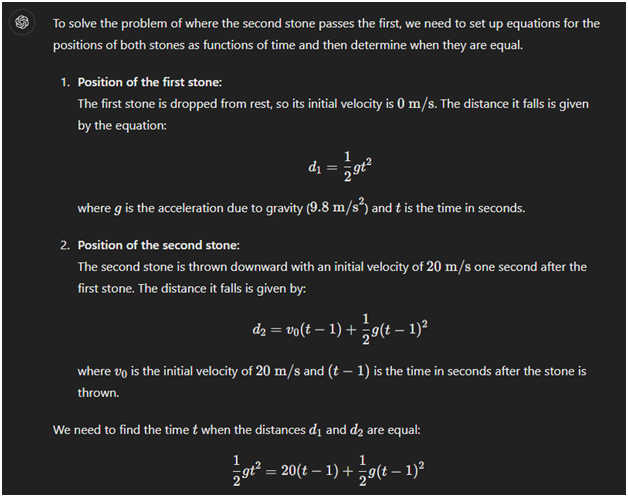
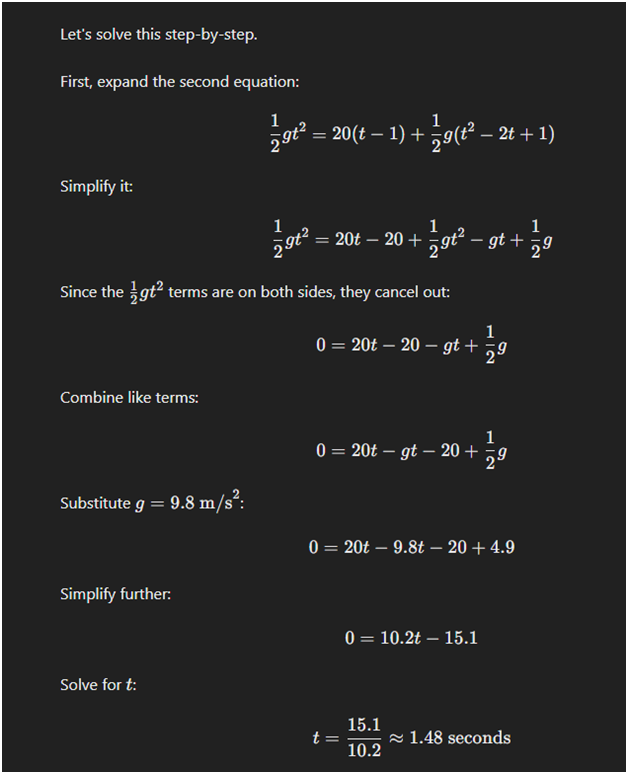
Claude used the same time (t) in both equations. But time for the second stone, let’s call it t2, is one second less than time for the first stone, t1. Using equations and hand calculations, admittedly an old-school approach, and setting t2 equal to t1-1, I got an answer of 10.74 meters. But using ChatGPT 4 (the paid version), I got the correct answer Here is ChatGPT 4 solution, cut and pasted: Wolfram’s solution of 10.76 m agrees with mine so I have to give the Wolfram plug in full credit.

The difference is minor and due entirely to using 9.8instead of 9.81 for g.

We have to give ChatGPT 4 full credit.

This exercise is not an endorsement of ChatGPT, nor a criticism of Claude. Several other LLMS got the wrong answer. Fewer got it right. LLMs are proliferating now and of course, I could not test them all, but fewer got it right. Each, however looked as if it was solving the problem correctly. That all of them knew which equations to use is impressive. But it’s scary to think of how many, given the believability of the appearance, will provide an answer that will be believed without being questioned.

As to the question whether any LLM, including ChatGPT, should be used for freshman physics or engineering problems, it seems that the process of having to check the validity of the answer with hand calculations each time would negate any time advantage they provide. What good is an answer provided in 2 seconds when you have to spend the same amount of time you used to spend to check it. You could give the same problem to several LLMs but unless each gives the same answer, there will doubt of all of them. No engineer is going to check 3 LLM and settle on the answer provided by 2 of the three.

For now, proceed with caution. AI had not yet proven it can be as reliable in the solution of all but the most trivial of math problems.

Crazy Idea: B2B Media Without Advertising

ChatGPT Chat with AI, Artificial Intelligence. Adult man chatting with a smart AI or artificial intelligence using an artificial intelligence chatbot developed, Futuristic technology transformation.

Eng Technica launches without advertising. What’s wrong with advertising? Where do I begin? Let me start with my entry into publishing in 1995.

By the mid 90s, you could say business to business media, AKA industry media, was broken. But that would imply that it was once whole and working.

B2B media, which relies primarily on advertising for revenue, can only work for the advertiser. B2B publishers may promise a church and state separation between editorial and advertising, that their editorial vision remains pure, untainted by advertiser pressure. However, that is a promise more honored in the breach.

B2B media coverage of an industry may start with the premise of fair and comprehensive coverage but the advertisers in that industry will make their interests known in not-so-subtle ways, and publishers will fall back to favoring the advertisers over everyone else.

This system, compromised as it was, worked as a business for a number of years. B2B was a lucrative business in the early 90s. B2B print magazines and trade shows proliferated. Even though the Internet was gathering steam, most content was still published on a printed page. And every printed page was backed up with an ad. It was Google that upset all of that. Not only were people getting their information from Google but Google monetized its search by offering advertising. It was sponsored links at first, but soon enough it was banner advertising. Looking back on it, it seems as if overnight, the search giant had become an advertising giant. It was B2B media that suffered the most. Every company that had been advertising in trade magazines began to do Google ads, which were less expensive and automated. You could launch an ad campaign in the middle of the night and never have to talk to a sales rep. A trickle of marketing dollars turned into a torrent. Unable to survive on the few marketing dollars left over, many industry publications closed their doors. The biggest engineering publication, Machine Design, published by Penton, became a shell of its former self. Eventually, Penton filed for bankruptcy in 2010. The B2B media that survived became increasingly desperate. With banner ads now at rock bottom (Google ads were selling for $3 to $4 per thousand) when at the height of B2B, they could command more than ten times that. under $10 CPM). It was not sustainable. With the bottom falling out of the advertising market, what was there to sell?

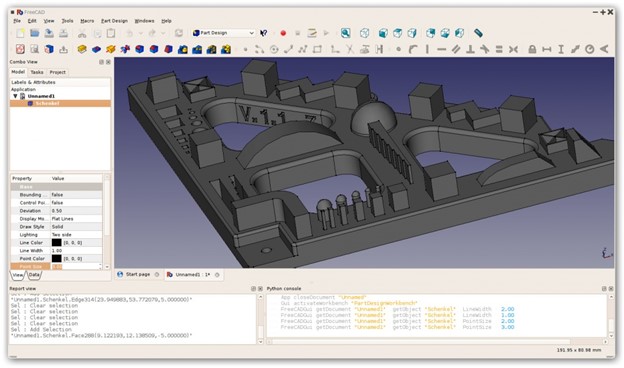
FreeCAD Nears Release

FreeCAD has released its first release candidate (RC1) for version 1.0, marking a significant milestone for the open-source project that began over twenty years ago.


This open-source parametric 3D modeler, forever in development,aims at a broad audience of hobbyists, designers, and perhaps even engineers—anyone for whom paying for solid modeling is an impediment.

FreeCAD is not the first or only free CAD program. Onshape has a free version. DraftSight and Fusion have had free versions, but corporations tend to gravitate towards monetizing programs once meant to be given away.

A major deterrent to free MCAD software is the geometry kernel, which a CAD developer must pay for. Thus, giving away MCAD programs is a money-losing proposition.

FreeCAD avoids the cash bleeding a commercial geometry engine would cause by using the Open CASCADE Technology (OCCT) as its geometry kernel, an open-source geometry kernel. OCCT appears to offer all the necessary parametric 3D surface and solid modeling, Boolean operations, visualization, and data exchange needed for professional product design.

According to its developers, the RC1 release is a call to action for the FreeCAD community to test and provide feedback. Users are encouraged to try the software on real projects and report any bugs to FreeCAD’s issue tracker. The development team expects that this release will help identify the final “release blockers” preventing a public release.

“We are currently down to just 7 release blockers,” says FreeCAD’s Aleksandr Prokudin in Hackster.io, “but we expect that the release candidates will bump that number up a tad, and that’s a good thing. While we desperately want 1.0 out, delivering a stable release is a big deal for us.”

RC1 has made several fixes over beta versions. One of the most notable fixes is the mitigation of the topological naming problem, along-standing issue in parametric modeling. This enhancement was made possible through the efforts of several developers and the integration of Real Thunder’s algorithm. Additionally, the user interface has seen various improvements, including the addition of a rotation center indicator and the introduction of selection filters to make it easier to manipulate vertices, edges, and faces. The task panel has been redesigned as a standalone, dockable widget, and the Transform tool’s appearance has been enhanced for a better user experience. Other UI updates include a new logo and the option to configure a tab-based workbench selector.

Developers interested in contributing to this effort can participate by fixing issues and submitting pull requests. FreeCAD has weekly merge meetings to review these contributions, making it an excellent opportunity for those wanting to get involved in open-source CAD development. This release candidate also aims to gather feedback from a demographic that typically avoids unstable software but is open to testing software that is nearly complete.

Still, the release of FreeCAD 1.0 RC1 is a major step towards the final release.

0FansLike
0FollowersFollow
0SubscribersSubscribe
Google search engine

Recent Articles

Trending Now