What do these guys know that we don’t? One chip can do everything. Now they have funding to develop a prototype.
What do these guys know that we don’t? One chip can do everything. Now they have funding to develop a prototype.
German hardware startup Ubitium has secured funding to develop what the company says is a “revolutionary universal processor.” Ubitium’s plan is to have one chip that does it all without having to have separate processors for different functions. The do-it-all chip will be built around RISC-V architecture.
What is RISC-V?
RISC-V is an open-standard instruction set architecture (ISA) based on reduced instruction set computer (RISC) principles. Unlike proprietary ISAs such as x86 (used by Intel and AMD) or ARM, RISC-V is free and open, meaning anyone can use, modify, and implement it without paying licensing fees. Successful implementation of RISC-V architecture has been NVIDIA, which has RISC-V cores for embedded controllers in its GPUs, SiFive, Western Digital and Alibaba’s semiconductor division, T-Head.
The whole processor is built around boundaries placed on computing tasks, says Hyun Shin Cho, CEO of Ubitium. “We’re erasing those boundaries. Our Universal Processor does it all – CPU, GPU, DSP, FPGA – in one chip, one architecture. This isn’t an incremental improvement. It is a paradigm shift.”
It does AI as well, according tot the company’s press release.
Previous attempts to combine CPU, DSP, GPU and FPGA functions have resulted in what is known as System on a Chip (SoC). Apple designs and utilizes SoC architecture in its blazingly fast M-Series chips, which devote part of itself to a neural engine. Other SoCs are made by Xilinx, Intel (Stratix 10) and AMD’s Versal ACAP.
Who’s Behind This?
Ubitium’s founder and CTO, Martin Vorbach, holds over 200 patents for semiconductor technology. He is keeping his CTO positions at PACT XPP Technologies and Hyperion-Core, where he is also listed as the founder in his LinkedIn profile. Vorbach studied computer science at Germany’s Karlsruhe Institute of Technology (KIT), where he met Hyun Shin Cho.
CEO Hyun Shin Cho has 20 years of experience in various industrial sectors. He studied engineering at KIT and Purdue.
Chairman Peter Weber has worked at Intel, Texas Instruments, and Dialog Semiconductor.
About Ubitium
Ubitium has raised $3.7M in a seed funding round led by Runa Capital, Inflection, and KBC Focus Fund.
The company has offices in Düsseldorf and Rülzheim in Germany.
Detroit-area-based Ducker Carlisle, a 175-member consulting and M&A (mergers and acquisitions) firm, has opened a Lisbon, Portugal office for its new SparkWise Data and AI service.
Specifically, the company now offers the following, according to the press release
Identification of the best AI, genAI, data monetization and automation use cases and roadmap for each client, based on market-specific insights developed over decades of business consulting as well as expert analysis of feasibility, costs, implementation timelines and potential ROI
Data quality evaluation, cleansing and management to support AI deployments, including data mapping across disparate systems, centralization of diverse data types into data lakes or lake houses and establishment of data governance programs
AI solution, tool development and implementation by Ducker Carlisle’s dedicated data and AI team in the U.S., Europe and India
Building strong AI cultures through acculturation sessions, training, workshops, hackathons and conferences
The main members of the Data and AI team are:
Fabien Cros, Chief Data and AI Officer, who previously was Data & AI Country Lead for Manufacturing at Google
Guillaume Denis, Generative AI Director, previously Google’s Data, AI & Measurement Lead for Automotive, Luxury and Travel
Arthur Derennes, Data Engineering Director, was previously VP of Engineering at Artefact and was involved in various industries.
Ducker Carlisle focuses on the following industries: automotive, industrial goods, building and construction, healthcare and heavy equipment. To those industries, it offers predictive modeling, real-time analytics, and custom AI tools for anticipating market trends, streamlining operations and driving innovation.
Mark Baum, over 7 years a partner of the BW Design Group for over 7 years, will be responsible for the Strategy to Commercialization platform.
BW Design Group, the St Louis-based AEC firm and system integrator, announced the launch of its Strategy to Commercialization concept.
With this concept, the BW Design Group hopes to cement its position as “the only independent, fully integrated AEC firm with a Manufacturer’s Mindset.”
If so, the company is the embodiment of a concept Autodesk has been pushing: that the AEC industry has a lot to learn from manufacturing, chiefly from manufacturers who have taken greater advantage of digital tools and processes. Whereas the manufacturing industry can’t seem to get enough technology at times, using robots on the assembly line, for example, AEC hangs back with men using hammers on the construction site. The construction industry was late to CAD. To this day, drawings still hang in construction trailers. The AEC industry has only just started on CAM, that is, if you include pre-fabrication, where parts of the building, or even whole rooms, are manufactured indoors and offsite.
“We understand the highest objective of converting capital strategies into commercialized products,” said Baum. “Aligning our unique capabilities to our clients’ evolving value chain deepens our ability to support them in realizing their most critical commercial objectives.”
BW Design Group considers itself a natural to modernize AEC because it alone had a manufacturing parent, the Barry-Whemiller Group, who has 40 years of experience in food and beverage, life sciences, household and personal care, and industrial and advanced technology. The combination of manufacturing knowhow and AEC need has propelled BW Design into venerated lists such as ENR’s Top 100 design-build firms, Top 100 design-build firms, Top 500 design firms, Top 400 construction firms, as well as Control Engineering’s Top 10 System Integrator Giant.
Other leadership changes were announced to support the Strategy to Commercialization concept.
Rob Redman, Partner and Market Sector Leader, will lead AEC for core markets, including food and beverage, life sciences and home and personal care;
Mike Card, Partner and Operations Leader for Advanced Technology will lead AEC for emerging markets, including data centers, semiconductor and battery manufacturing.
John Bruton, Partner and Discipline Leader for Architecture, Engineering and Construction, will lead AEC operations as well as business development and project delivery for the Eastern U.S.
Jason Martinez, Partner, will lead business development and project delivery for AEC in the Western U.S.
Bruce Kuebler, Partner, will lead business development and project delivery for AEC in the Central US
On day 3, I am trying to add furnishings and fixtures to the floor plan I left on day 2. I am reminded of a saying: “The last 10% of the job takes 90% of the time.”
It may look as if I was able to populate the floor plan with furniture, fixtures, and even a car — but none of it is mine. They are all generic blocks. That is all the free version of Rayon allows. In some cases, the generic block is nothing like what I have, and no amount of stretching and scaling will make it right.
Then, there’s the language problem. Rayon’s UI may be in English but it is made in France. They have a different word for everything. Sofa does not translate, for example, because I couldn’t search for it among the blocks listed. There are no toilets, either, but urinals. Searching for blocks is like using a mental thesaurus.
I should be ashamed for looking a gift horse in the mouth. I had to step back and think how easy it was to create the furnished floor plan. It took 3 hours. Almost no help was required. I did not have to watch a video (though if I had, I’m sure it would have taken less time). It will take days with a CAD program if all the blocks have to be made by hand. Should I pony up the €19 ($20 at today’s exchange rate) a month? It would be fun to explore the thousands of blocks that are available.
It makes sense to have to pay for a finely crafted model of my car, for example.
Wish list
I wish Rayon would provide a filter so I could look through only free blocks when I search. Or at least sort the blocks so free blocks are on top.
Simple symbols should be provided for free. I was not able to make any electrical plan because the switch and outlets were not free. Really, Rayon? Having to create a duplex electric wall outlet just kills the ease-of-use vibe.
COMSOL, the last major independent simulation vendor, continues to maintain a torrid pace of innovation, adding to its lead among all multiphysics simulation software suppliers with the release of COMSOL Multiphysics Version 6.3. This latest update introduces features that enhance modeling efficiency and simulation speed (GPU-accelerated acoustic computations), improve the user experience, plus add a ton of functionality, such as with the dedicated Electric Discharge Module.
Electric Discharge Module
New in COMSOL Version 6.3 is the Electric Discharge Module, which lets you analyze electric discharges, such as lightning, and arcs, such as arc welding. The analysis strings together a variety of physics and considers the complex behavior of various materials. (solid, liquids, gases in a material library), plus phase changes, chemical reactions, and short total time duration, which requires infinitesimal time steps as low as sub-nanoseconds to evaluate transient activity and boundary conditions near electrodes. The Electric Discharge Module can interface with electrical circuits to analyze reactions to electrical components using 2D or 3D field models or by importing data in SPICE format. GPU-Accelerated Simulations
Pressure acoustics in an office environment, modeled in COMSOL Multiphysics Version 6.3 using GPU support for 25x faster results. Image: COMSOL
Version 6.3 introduces GPU acceleration for transient acoustics simulations, bringing a performance boost of up to 25 times compared to CPU-based computations. GPU acceleration is now available across key modules:
Automotive and architectural acoustics.
Consumer electronics
Geometry Preparation and Automation
More and better defeaturing in COMSOL V6.3, such as fewer regions around fillets. Image: COMSOL.
Importing CAD models into COMSOL Multiphysics has been streamlined with advanced geometry preparation tools. Key features include:
Automated Defeaturing: The software removes irrelevant details such as small fillets and holes, simplifying the model while preserving essential geometry.
Error Correction: Automatic identification and fixing of geometric issues such as gaps, overlaps and misalignments.
Simplified Meshing: Cleaned-up geometries lead to better-quality meshes, which improve simulation accuracy and stability.
Interactive Java Environment
The addition of an interactive Java environment in Version 6.3 provides advanced users with new opportunities for customization and automation. Highlights include:
Dynamic Model Modifications: Users can programmatically alter models during simulations, creating adaptive workflows.
Chatbot-Assisted Coding: A built-in chatbot tool simplifies programming in the COMSOL API by providing code snippets and answering user queries.
Application-Specific Improvements
The updates in Version 6.3 extend across multiple domains, enriching the simulation capabilities of the platform:
Streamlines and relative strength of secondary flow in a semicircular duct, calculated with the SSG–LRR Reynolds stress model. Image: COMSOL.
1. Fluid Flow Modeling
Reynolds-Stress Turbulence Models: Introduced for more accurate simulations of anisotropic and separated flows, these models are essential for industrial processes involving heat exchangers, reactors and aerodynamics.
Free Surface Flow Improvements: Enhanced tools for modeling interfaces between immiscible fluids, particularly in simulations involving mixing, sloshing and coating.
2. Electromagnetics Simulations
Electrostatic Forces for MEMS: Improved methods for calculating forces and torques in MEMS devices result in better optimization of designs.
Laminated Iron in Motors and Transformers: New tools for accurately modeling magnetic losses and thermal effects in laminated iron cores.
Transmission Line Modeling: Enhanced RLGC parameter extraction for RF and microwave devices ensures better performance predictions.
3. Structural Mechanics
Thin Structure Electromechanics: Enables precise modeling of piezoelectric and electrostatic effects in thin structures, such as sensors, actuators and energy harvesters.2
Stress Recovery: Improved algorithms for stress recovery provide more detailed insights into structural integrity.
4. Wave Optics
Periodic Structures Workflow: Simplifies simulations of photonic crystals, diffraction gratings and metasurfaces, speeding up workflows while maintaining accuracy.
Nonlinear Optics: Improved modeling of nonlinear optical phenomena, essential for laser design and telecommunications.
5. Surrogate Modeling
Efficient data sampling tools have been introduced for surrogate model generation, providing approximate results for complex simulations with reduced computational effort. This feature benefits optimization studies and parametric sweeps.
Enhanced Usability
Version 6.3 also emphasizes user accessibility and collaboration:
Improved Model Manager: Expanded version control and tagging capabilities make it easier to organize, search and collaborate on simulation projects.
Visualization Updates: New rendering options for clearer presentation of results, including dynamic visualizations for transient and multiphysics simulations.
Documentation and Training: Updated resources, tutorials and examples have been added, facilitating faster onboarding for new users.
About COMSOL Multiphysics
A speaker with a single physics model can help visualize the electromagnetic force acting on the voice coil. A multiphysics model can also account for acoustic–structure interaction. Image: COMSOL
COMSOL Multiphysics allows its users to model, analyze and optimize designs across a broad spectrum of industries. Its defining feature is the ability to couple multiple physical phenomena—mechanical, electrical, thermal, fluid and chemical processes—within a single model. This approach is not only convenient but accurate since there is no data lost when converting from the output of one solution to the input of another.
Core Components:
Model Builder: The central interface for constructing, solving and evaluating models.
Application Builder. COMSOL alone allows its users to create apps tailored to specific simulations so that more users can apply the COMSOL solver without needing to have and learn the complete COMSOL program.
Model Manager: Organizes and tracks versions, ensuring streamlined workflows and robust collaboration.
This software is widely used in various industries, including renewable energy and electronics, automotive and aerospace, and it is used to simulate just about anything, including wind turbines, battery design, and all sorts of cons
We love CAD on Apple Vision Pro. We saw it being used for CAD at Shapr3D’s Vision Pro event. The 4K resolution per eye will take your breath away. However, there may need to be more of us. Apple has sensed the soft demand and has reduced production of the Vision Pro, according to The Information.
Apple launched Vision Pro with great fanfare in June of 2023. Suppliers have produced components for 500,000 to 600,000 Vision Pro units, but production was halted in May. Apple has also informed assembler Luxshare to potentially stop manufacturing in November.
The device’s cost, about $3,500, is said to be the biggest factor. Apple still has not officially commented on the production stop. The company had been planning to release a less expensive Vision product with fewer features by the end of 2025. That would have helped it better compete with Meta’s $500 headset. It is not known what the less expensive Apple headset will cost, and with this news, we wonder if the lesser model will come to be.
It’s a setback for the high-end AR/VR/XR market, which Apple was trying to take over with the Vision Pro. Indeed, Apple has a way of taking over markets, as it did with the iPod (music devices), iPhone (smartphones), iPad (tablets) and the Apple Watch. Under Steve Jobs, Apple put design first and an emphasis on quality to acquire such a cachet that they were able to charge extraordinary premiums. iPhones, for example, sell for 25% more than Android phones on average.
With a string of product successes under Jobs, you could bet on Apple to create the next big thing, the sensational new product. The lack of success with the Vision Pro breaks the string.
At the September 2024 Apple Event, CEO Tim Cook committed to AI. In April 2024, Apple scrapped plans for an iCar (our name for Apple’s Project Titan). To the Apple-faithful, the iCar would have been the next Big thing.
The Vision Pro may have its fans among affluent gamers — unless that is a contradiction in terms. Outside of conferences and user events, such as Shapr3D’s Vision Pro announcement, the Vision Pro was rarely seen or heard of. I’ve only seen one Vision Pro in the wild, and that was on a passenger on a flight to San Francisco.
Shapr3D remains the only CAD company to have shown interest in Apple’s Vision Pro. It may have been love at first sight for István Csanády, who recognized it as an AR/VR headset without equal. With the Vision Pro, he was all in. Had the Vision Pro taken off, Shapr3D would have had first mover advantage, just as it did when it was first introduced to us, the first serious MCAD program running on Apple’s iPad.
We love CAD on Apple Vision Pro. We saw it being used for CAD at Shapr3D’s Vision Pro event. The 4K resolution per eye will take your breath away. However, there may need to be more of us. Apple has sensed the soft demand and has reduced production of the Vision Pro, according to The Information.
Apple launched Vision Pro with great fanfare in June of 2023. Suppliers have produced components for 500,000 to 600,000 Vision Pro units, but production was halted in May. Apple has also informed assembler Luxshare to potentially stop manufacturing in November.
The device’s cost, about $3,500, is said to be the biggest factor. Apple still has not officially commented on the production stop. The company had been planning to release a less expensive Vision product with fewer features by the end of 2025. That would have helped it better compete with Meta’s $500 headset. It is not known what the less expensive Apple headset will cost, and with this news, we wonder if the lesser model will come to be.
It’s a setback for the high-end AR/VR/XR market, which Apple was trying to take over with the Vision Pro. Indeed, Apple has a way of taking over markets, as it did with the iPod (music devices), iPhone (smartphones), iPad (tablets) and the Apple Watch. Under Steve Jobs, Apple put design first and an emphasis on quality to acquire such a cachet that they were able to charge extraordinary premiums. iPhones, for example, sell for 25% more than Android phones on average.
With a string of product successes under Jobs, you could bet on Apple to create the next big thing, the sensational new product. The lack of success with the Vision Pro breaks the string.
At the September 2024 Apple Event, CEO Tim Cook committed to AI. In April 2024, Apple scrapped plans for an iCar (our name for Apple’s Project Titan). To the Apple-faithful, the iCar would have been the next Big thing.
The Vision Pro may have its fans among affluent gamers — unless that is a contradiction in terms. Outside of conferences and user events, such as Shapr3D’s Vision Pro announcement, the Vision Pro was rarely seen or heard of. I’ve only seen one Vision Pro in the wild, and that was on a passenger on a flight to San Francisco.
Shapr3D remains the only CAD company to have shown interest in Apple’s Vision Pro. It may have been love at first sight for István Csanády, who recognized it as an AR/VR headset without equal. With the Vision Pro, he was all in. Had the Vision Pro taken off, Shapr3D would have had first mover advantage, just as it did when it was first introduced to us, the first serious MCAD program running on Apple’s iPad.
Blocks. like these sliding doors, are a joy to work with – and behold, with Rayon.
Blocks. like these sliding doors, are a joy to work with – and behold, with Rayon.
I resume work on the floor plan created yesterday with a bit of apprehension. My floorplan does not show up in the list of files that can be opened. I had slammed down the lid of my laptop rather hurriedly to catch a flight. The only file showing is “Test” with a blank icon. There is trace of yesterday’s floor plan. But when I open “Test,” there is my floor plan just as I had left it! I should not have been worried. Rayon, like most well-behaved cloud applications, continually saves your work. I notice a little clock icon on the top right of the screen that confirms Rayon is saving.
I am plunging into Rayon with no instruction to prove a point: no CAD program is so easy to use that you can use it without training, instruction or at least a YouTube video series. Invariably, all so-called easy-to-use CAD programs, have failed to live up their billing if easy-to-use is defined as being able to create a simple drawing or part without any sort of help. Including. So, after only a one-minute online demo, I jumped right into Rayon. That was day 1. I expected to get bogged down. That didn’t happen. I sailed through an hour on Rayon without having to look anything up. The program was oddly and wonderfully intuitive. Walls just worked. Furthermore, Rayon was quick. It took two seconds to pull up the drawing but after that, I was never reminded the program was running on a remote server.
But today we will find out if Rayon handles windows and doors with equal aplomb.
But first, a little house-plan cleaning. Yesterday’s walls were placed approximately from memory in an airport lounge. Today, I have the exact dimensions on a drawing on my second screen in the office.
Changing the wall dimensions is fairly easy with Rayon. Clicking on a wall brings up its parameters in an editable box next to the wall. You can override the number shown and the wall will update to its new length. Hower, it seems as if the wall contracts or expands from its center, which left gaps between it and the adjoining wall or made the end of the lengthened wall come out the other side of the adjoining wall. It would be nice if could sense which end of the wall is to change. That could be done by letting the pick point determine be the end of the wall to change.
It takes a bit of trial and error and a combination of methods to get the walls more exact. Sometimes, I stretch the walls endpoints to close to the exact length and then make it exact by entering the length. I’m sure there is a better way, I just haven’t stumbled upon it yet.
I continue to be overjoyed by how quickly Rayon reacts and how neatly it joins walls. Walls are almost always joined automatically forming neat corners. I have not had to use the Trim command once. In fact, I’m not even sure Rayon has a Trim command.
I am using Rayon’s snap to angles. The angles snap to 45-degree increments. Most floor plans require little else.
Getting the walls to within inches takes a half hour. I am ready to add doors. But what looks like the door is the Opening icon, which makes an opening the wall (duh) with no doors. Where were those doors with neat little handles I saw in the demo?
For the first time, I had to look something up. The real doors and windows are in the Blocks menu. I see are thousands of blocks ready to be used. Many are only available for paying users, however. However, the more sophisticated models are available with the paid versions of Rayon which start at €19/ month. But, the basic generic doors and windows are sufficient for my purpose.
To my delight, Rayon is smart enough to orient the door to the nearest wall and cut out the exact opening for it. The opening is dynamic so if the door moves, the opening keeps up. There’s a one in four chance the door will swing or pivot the right way but since it easy enough to correct (you can flip it vertically or horizontally, why bother trying to find out the rules or if Rayon has any.
For sliding doors, the free blocks were a bit limited and for garage doors, there were no blocks at all, free or paid. However, I was ablet to take the wrong sized door and stretch it to fit. Rayon was surprisingly accommodating. The sliding doors contracted properly with their changed opening, keeping to the wall thickness. Had I used a Scale, I would have to have expanded along an axis, an option with other CAD commands.
After an hour of drawing (not including this writing), the walls are within inches of where they should be, and all the doors and windows are in. I admire the drawing. The detail in the drawings and window blocks have made the floor plan look quite a bit more professional. My previous drawings, drawn with an industry leading CAD program, look like they were drawn in Amateur Hour. Because I had to create my own doors and window blocks, they had been made with the least detail. A door was a simple rectangle at 45 degrees and an arc. My Rayon drawing, on the other hand, has doors with door handles and framing.
Rayon promises to be a drop-dead-easy program for creating floor plans. The website is pretty slick and modern, so I bite. And within minutes, floor plans are being created, with walls being made square and straight, doors and windows just popping in, no need for trimming and cutting, all sorts of furniture is on hand…
What’s not to like?
From the videos, Rayon seemed like a magic trick compared to industry standards I had previously used for making floor plans, namely SketchUp and AutoCAD.
Here was a program that was able to jump ahead of an established standard ( AutoCAD) and even what was considered to be the easiest-to-use CAD program in existence (SketchUp), and at the same time, be thoroughly modern (running on the cloud and in a browser, without the need of a download, capable of running on any device, anywhere). It seemed to be too easy.
Was it too good to be true?
We had to find out. Could those who need to have floor plans but do not want to either have to learn AutoCAD or pay for it have an answer with Rayon?
The answer is nuanced.
It’s easy enough to get started. As soon as you open an account, Rayon will be immediately available. Unless you try to use it on an iPad, as I did, believing it was device agnostic. That resulted in an odd display that was impossible to interact with. Perhaps it was a Safari problem. It led to a recursive email dialog without resolution. So we continue the story on a Windows computer, with which it was much better behaved.
A quick floor plan was easy enough to create room by room. Once the wall command is selected, you can create rooms one by one. As you are doing so, the dimensions are displayed. You can be approximate at this point with the confidence that they can be exactly specified later, as the slick demo has promised.
It is with joy that we see walls are added without the need for trimming, that they snap to being horizontal and vertical, and that they can infer, by selecting corners, what the endpoints need to be. In other words, a wall can line up with the opposite wall just by moving the cursor over the opposite corner.
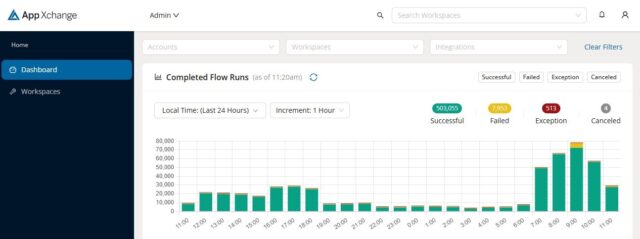
With App Xchange, software developers can build integrations that can be sold as ready-to-use options for customers. App Xchange can also be used directly by construction contractors to build integrations between Trimble and other software solutions.
With App Xchange, software developers can build integrations that can be sold as ready-to-use options for customers. App Xchange can also be used directly by construction contractors to build integrations between Trimble and other software solutions.
Trimble has embraced the Apple App Store model with its Trimble App Xchange and it is off to a good start with over a hundred apps that tie into Trimble software. These apps enable users to link data across multiple platforms throughout various project phases.
Trimble’s App Exchange will open another dimension to construction professionals, giving them the autonomy to set up these integrations themselves without the need for IT support or having to rely on customized solutions by developers.
Designed for flexibility, these apps help contractors and project managers address unique project requirements, enhancing their ability to track budgets, schedules, and documentation in real-time.
“We are committed to helping our customers achieve greater productivity and better outcomes by simplifying technology integration,” says Elwyn McLachlan, VP of Trimble’s Project and Program Management Division. “By fostering connectivity and data flow, Trimble’s latest tools aim to improve productivity and deliver smoother, more coordinated construction projects.”
A few of what’s in store:
TOOLTRIBE uses Implemtor to build an integration between Trimble ViewpointVista and their cloud-based app.
“Getting data in and out of App Xchange has been very clear and straightforward,” said Kav Latiolais, software engineer at TOOLTRIBE.
Document Crunch which claims to simplify complex construction documents, identifies project risks and streamlines critical workflows to support better project outcomes.
ProjectMark is a construction-specific customer relationship management (CRM) system that helps contractors enhance their digital presence and improve client acquisition.
“Having all Trimble integrations in one place makes it easy for contractors to pick and choose the solutions that best fit their specific needs — whether they be financial or project-related,” said Peppler. “It also helps make the construction industry more approachable to technology startups by providing entrepreneurs an easy way to interconnect their solution with others, driving up the value to contractors who are explicitly looking to make their businesses more efficient and profitable.”
App Xchange is available as part of Trimble Construction One, a connected suite of software solutions that automates workflows and synchronizes data so that contractors can more easily design, build and maintain their projects.






 GPU-Accelerated Simulations
 Pressure acoustics in an office environment, modeled in COMSOL Multiphysics Version 6.3 using GPU support for 25x faster results. Image: COMSOL
 Geometry Preparation and Automation